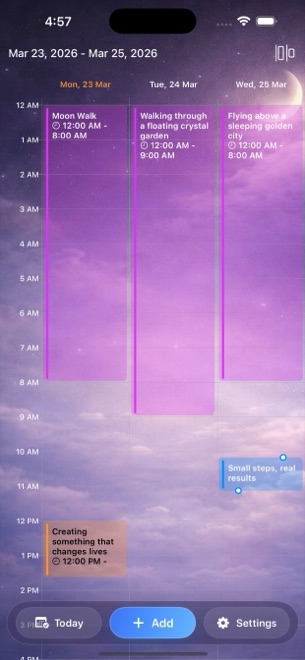
Dreams Calendar vs Apple Notes for dream logging: 10 tracked signals & Swift Charts vs blank folders
Almost every dream keeper starts with a "Dreams" folder in Apple Notes because it is already on the iPhone, opens quickly and syncs via iCloud. People outgrow Apple Notes once 40 dated notes pile up with no calendar blocks, no consistent emotion tags and zero way to chart how sleep quality, latency, awakenings and nightmares actually move over time — the exact structure Dreams Calendar provides for free.
1. Bedside structure at 7:00 AM vs a blank white note
Opening Apple Notes half-awake forces you to create a note, type today’s date, remember what sleep details you meant to record and write paragraphs from scratch. Within two weeks, formatting drifts: some notes mention bedtime, some use different mood words and blank-dream mornings get skipped entirely.
Dreams Calendar’s step-by-step wizard asks one clear, skippable question at a time: sleep start and end, 1–10 sleep quality stars, 1–10 morning energy segments (each with a plain one-line reading as you tap), sleep latency in minutes, awakenings, nightmares, dream text and 30 tappable emotion chips.
| Workflow element | Dreams Calendar (v1.1) | Apple Notes Dream Folder |
|---|---|---|
| Morning prompt structure | Guided, skippable step-by-step wizard | Blank page (unless you copy-paste a text template daily) |
| Consistent emotion tagging | 30 tappable positive & negative chips (zero typing) | Manual #hashtags prone to typos & synonyms |
| Sleep window visualization | Drawn across real sleep hours in Day & Multi-day views | Plain text timestamps only |
| Dedicated calendar views | Month, Day, Year, Multi-day, List & Statistics | Folder list sorted by edit/creation date |
| Separation from errands & work lists | Dedicated space solely for dreams, sleep & reflections | Lives beside grocery lists & work meeting notes |
| Sketches, scans & audio attachments | Not included (focused text & signals) | Apple Pencil sketches, inline audio & attachments |
2. Automatic 10 Swift Charts vs manual re-reading
Apple Notes has fast keyword search, yet it cannot calculate your average sleep latency in October, rank your top five negative dream emotions or test whether higher sleep quality aligns with calmer emotional balance.
Dreams Calendar turns your daily taps into 10 interactive Swift Charts automatically: five sleep trend graphs, two emotion bar charts, weekly dream counts, daily nightmare counts and a sleep-quality-vs-emotion-balance scatter plot with Month, Year, Custom range and All-time filters.
| Capability | Dreams Calendar (v1.1) | Apple Notes |
|---|---|---|
| Built-in sleep & dream charts | 10 interactive Swift Charts | 0 charts |
| Evening reflection pairing | 5-question Day Reflection wizard on same timeline | Manual note writing |
| Storage & iCloud sync | On-device SwiftData only; no iCloud sync | Local or iCloud synced across iPhone, iPad & Mac |
| Locking sensitive entries | iOS 18 native Home Screen Require Face ID for whole app | Per-note password / Face ID lock |
| Export options | None in v1.1 | Share as text, Pages or PDF |
3. Both cost $0 — when to graduate from Apple Notes
Keep Apple Notes if you sketch dream maps with an Apple Pencil, want instant Mac desktop editing via iCloud or only write down two vivid dreams a year.
Move to Dreams Calendar when you want a real daily habit: one configurable morning reminder that opens straight into the wizard, six calendar views and 10 statistical charts for $0 (with occasional AdMob interstitials outside the writing flow).
| Need | Dreams Calendar | Apple Notes |
|---|---|---|
| Price | $0 (occasional AdMob interstitials; 0 IAPs) | $0 (preinstalled with iOS, 0 ads) |
| Daily morning reminder straight into wizard | Built-in single configurable reminder (8:30 AM default) | Requires separate Apple Reminders setup |
| Spotting multi-month sleep & nightmare patterns | Instant across 10 Swift Charts | Impossible without manual spreadsheet tallying |
| Cross-device Mac typing & PDF sharing | Local iPhone/iPad only; no v1.1 export | Seamless via iCloud Notes |
Can I paste old dreams from Apple Notes into Dreams Calendar?
There is no bulk import button in v1.1, though you can create backdated entries manually on past dates and paste text into the wizard.
Does Dreams Calendar clutter my system Apple Calendar or Notes?
No. Dreams Calendar never asks for Calendar or Notes access and keeps its entries completely separate from work schedules and grocery lists.
How do I lock Dreams Calendar if it has no per-note password like Apple Notes?
On iOS 18 or iPadOS 18, long-press the Dreams Calendar icon on your Home Screen and tap Require Face ID.
Will an ad pop up right when I open the morning reminder?
Never while writing. Occasional full-screen ads appear only after roughly ten view switches or two saved entries.