Dreams Calendar vs Apple Journal: dedicated dream & sleep wizard vs stock iOS freeform diary
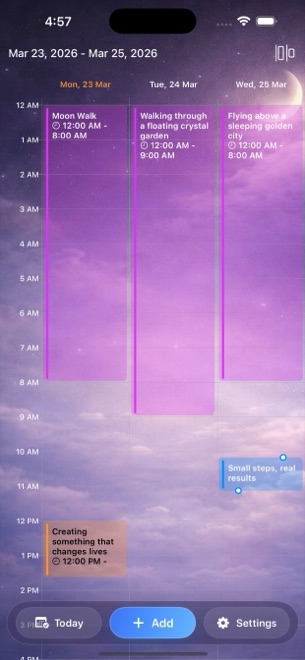
Apple Journal is preinstalled, completely ad-free and deeply integrated with iPhone photos, workouts, locations and iCloud sync. Dreams Calendar is purpose-built for the part of the day Apple Journal leaves unstructured: capturing overnight sleep windows, dream diaries, 30 emotion chips, daydreams and five-question evening reflections on a real hour-by-hour calendar with 10 Swift Charts.
1. Structured morning wizard vs life-moment suggestions
Apple Journal shines when curating memories from a trip, workout or photo album using iOS Journaling Suggestions and Apple’s State of Mind check-in. However, opening it at 7:00 AM to log a fading dream drops you onto a blank multimedia card with no fields for sleep hours, sleep latency, night awakenings or nightmare counts.
Dreams Calendar replaces the blank card with three dedicated entry wizards. Choosing Night Dream asks one calm, skippable question per screen — sleep window, 1–10 sleep quality stars, 1–10 morning energy, latency minutes, awakenings, nightmares, dream text and 30 emotion chips — so sleepy mornings still produce structured data.
| Feature | Dreams Calendar (v1.1) | Apple Journal |
|---|---|---|
| Morning dream & sleep wizard | Built-in 7-signal sleep + dream diary + 30-emotion wizard | Manual freeform text entry only |
| Daydream & evening reflection modes | Dedicated Day Dream & 5-question Day Reflection wizards | General reflection prompts & State of Mind link |
| Photos, audio clips & map pins | Not included (text & structured signals only) | Native photo, video, voice audio, workout & location attachments |
| Calendar & timeline views | 6 views: Month, Day, Year, Multi-day sleep blocks, List, Statistics | Chronological feed with basic calendar date filtering |
| iPad native interface | Native on both iPhone (iOS 18+) and iPad (iPadOS 18+) | Historically iPhone-first (check iPadOS version support) |
| System permissions requested | Optional notification permission only | Optional Journaling Suggestions, Photos, Microphone, Health, Location |
2. Ten sleep-and-emotion Swift Charts vs streak counters
Apple Journal tracks writing streaks, word counts and days journaled, while pushing mood trends over to the Apple Health app if you log State of Mind separately. It cannot tell you whether nights with three awakenings follow stressful workdays or how sleep latency moved over the past quarter.
Dreams Calendar computes 10 interactive Swift Charts directly inside its Statistics view: five sleep trend charts (quality, duration, latency, awakenings, morning energy), two top-emotion charts, dream logs per week, nightmares per day and a scatter chart comparing sleep quality against emotion balance.
| Analytics capability | Dreams Calendar (v1.1) | Apple Journal |
|---|---|---|
| Built-in sleep trend charts | 5 charts: quality, duration, latency, awakenings, morning energy | None inside Journal |
| Dream & nightmare frequency charts | Dream logs per week & nightmares per day | None (requires manual keyword search) |
| Emotion breakdown & scatter correlation | Top positive/negative bars + sleep quality vs emotion balance scatter | Delegates State of Mind charts to Apple Health |
| Interactive date filtering | Month, Year, Custom range or All time with drag-to-inspect points | Summary streak & entry counts |
| System Calendar separation | Completely separate from work meetings in Apple Calendar | Separate feed, draws context from system activity |
3. Storage, lock, ads and using both apps side by side
Apple Journal is completely free with zero ads, locks natively with Face ID and backs up via encrypted iCloud sync. Dreams Calendar is also free with zero subscriptions, stores everything in local on-device SwiftData without iCloud sync or file export in v1.1, and displays occasional AdMob interstitials outside the writing flow.
Because neither app charges a subscription, many iPhone owners keep both: Apple Journal for weekend photos, voice memos and travel memories, and Dreams Calendar on the nightstand for daily sleep, dream and evening reflection patterns.
| Criterion | Dreams Calendar | Apple Journal |
|---|---|---|
| Price | Free (supported by occasional AdMob interstitials) | Free (built into iOS, zero ads) |
| Storage & iCloud sync | On-device SwiftData only; no iCloud sync | On-device + encrypted iCloud backup/sync |
| Biometric lock | Via iOS 18 Home Screen Require Face ID | Built-in Journal Face ID / passcode lock |
| Export options | None in v1.1 | Print / PDF export via iOS share/settings |
| Ideal role on your iPhone | Structured sleep, dream & daily reflection calendar | Multimedia life scrapbook & photo journal |
Why use Dreams Calendar if Apple Journal is already free on my iPhone?
Apple Journal is a freeform scrapbook for photos and text, whereas Dreams Calendar records sleep windows, latency, awakenings, morning energy, nightmares and 30 emotions to build 10 dedicated charts.
Does Dreams Calendar write data into Apple Health or read my Apple Calendar?
No. Dreams Calendar never asks for HealthKit or system Calendar permissions; everything stays isolated in its own local SwiftData store.
Can I lock Dreams Calendar with Face ID like Apple Journal?
Yes, through iOS 18 itself: long-press the Dreams Calendar icon on your Home Screen and choose Require Face ID.
Does Dreams Calendar sync entries to iCloud?
No. Entries remain strictly on the iPhone or iPad where you logged them, with no iCloud mirror.