For iPhone and iPad

Plan the day. Reflect on the night.
See the pattern.

Dreams Calendar is a calendar that remembers more than the schedule. Each entry is a night dream, a day dream or a day reflection, logged in a short wizard that asks one question at a time: when you slept, how well, how much energy you woke with, what you dreamed, how you felt. Weeks later, the charts show what your nights and your days have to do with each other.

Free. Everything stays on your device. · iOS 18 · iPadOS 18

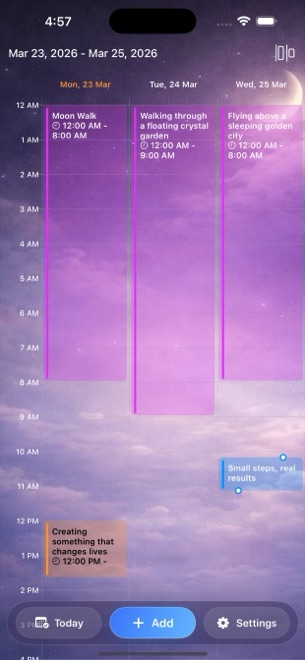
Dreams Calendar on iPhone: a three-day view with night dreams as long violet blocks and a day reflection in amber.
  • Night dreams, day dreams, day reflections
  • Ten signals per entry: sleep, energy, emotions, nightmares, more
  • Six views: month, day, year, multi-day, list, statistics
  • Ten charts, including sleep quality against emotion balance
  • No account, no cloud, nothing leaves the phone

What it does

A calendar with three kinds of entry and one honest question at a time.

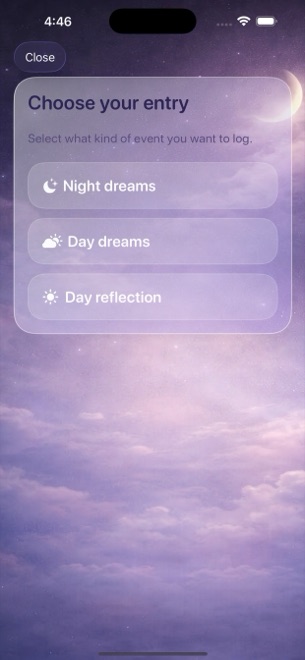
Tap Add, choose the kind of entry, answer the wizard, save. The rest is looking back: in the calendar views, and in the statistics.

Three kinds of entry

Three kinds of entry

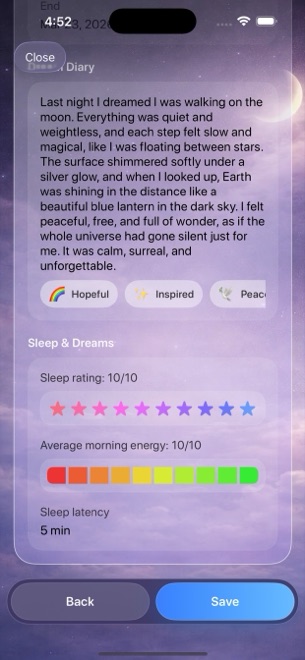
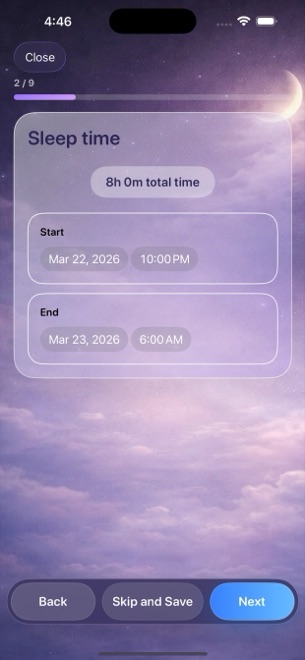
Night dreams cover a sleep: its start and end, a dream diary, sleep quality, morning energy, how long it took to fall asleep, how often you woke, how many nightmares. Day dreams hold a thought, a visualisation, an idea, with the emotions around it. Day reflections ask how you spent the day, what was hard, how you reacted, what you enjoyed and how you feel now.

  • Night dreams: sleep window plus seven sleep signals
  • Day dreams: text, time and emotions
  • Day reflections: five questions about the day
  • Every step can be skipped and saved
A diary with emotions, not a mood number

A diary with emotions, not a mood number

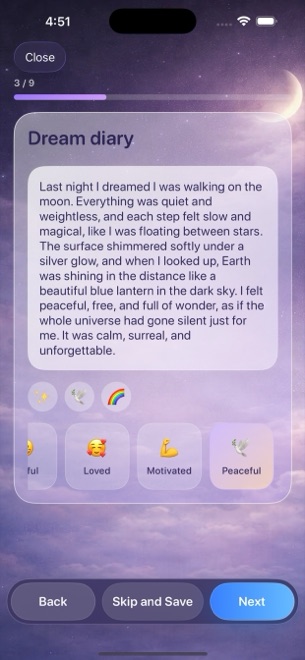
The dream diary is free text. Under it, emotion chips: fifteen positive, from calm to confident, and fifteen negative, from anxious to worried, picked with a tap, as many as apply. The same chips return in reflections, so the statistics can count them across nights and days.

  • Thirty emotions as tappable chips
  • Multiple per entry
  • Counted later in the charts
Sleep on a ten-star scale

Sleep on a ten-star scale

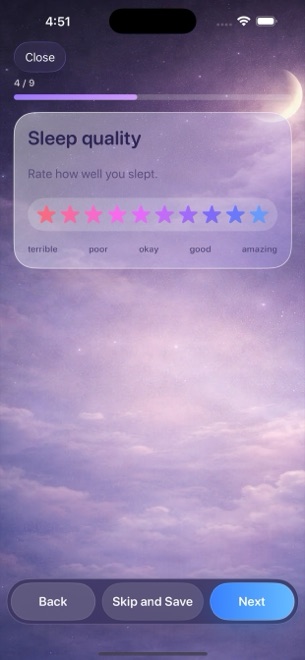
Sleep quality is ten stars, from terrible to amazing. Morning energy is ten segments, from exhausted to energised. Latency in minutes, awakenings and nightmares as counts, each with a one-line reading as you pick, so a two-second answer still means something later.

  • Sleep quality and morning energy, 1 to 10
  • Latency, awakenings, nightmares
  • A reading for each value as you choose it
Six ways to look back

Six ways to look back

Month, day, year, a seven-day timeline, a list of everything, and statistics. Night dreams sit as long blocks over the sleep hours; day entries at their time. Switch views from the menu in the top bar; the toolbar keeps Today, Add and Settings under your thumb.

  • Month, Day, Year, Multi-day, List, Statistics
  • Sleep drawn across its real hours
  • Today, Add, Settings always one tap away
Ten charts that connect the nights to the days

Ten charts that connect the nights to the days

Average sleep quality, duration, latency, awakenings and morning energy over time. The most common positive and negative emotions. Dream logs per week, nightmares per day. And a scatter of sleep quality against emotion balance, the positive emotions minus the negative ones, for anyone who suspects the two are related. Filter by month, year, custom range or all time; drag to inspect a point.

  • Five sleep charts, two emotion charts
  • Dream and nightmare counts
  • Sleep quality versus emotion balance
  • Month, year, range or all time
One reminder, at a time you choose

One reminder, at a time you choose

A single daily notification, half past eight by default, asks you to write down last night. Tap it and the wizard opens. Turn it off or move it in Settings. There are no other notifications.

  • One daily reminder
  • Opens straight into a new entry
  • Off or rescheduled in Settings

Who it is for

For people who want to notice, without being coached.

Dreamers
The dream is gone by breakfast unless it is written at once. The reminder and the diary are for the first five minutes of the morning.
Light sleepers
Latency, awakenings, quality, energy: four numbers a morning, and a month later a line that finally shows the bad weeks.
Journal keepers
Five questions in the evening, emotions as chips instead of paragraphs, and a calendar to find the day again.
Not for
Anyone who needs sync, export or medical guidance. Entries live on one device, and nothing here is a diagnosis.

What it costs

Nothing. It runs on occasional ads.

The app is free and has no in-app purchases. It shows a full-screen ad now and then, after about ten view switches or a couple of saved entries, and never in the middle of writing. That is the whole business model.

Free

$0 no account

  • All three entry kinds
  • All six views
  • All ten charts
  • Daily reminder
  • Seven languages
  • Unlimited entries

Occasional full-screen ads.

There is no paid tier. Every feature is in the free app; the occasional ad is the price.

Price →

Questions

Asked often enough to write down.

Where are my entries stored?

On the device, in the app's own database. There is no account, no server and no iCloud sync. That also means no backup beyond your device backup and no sync to a second device.

Does it read my system calendar?

No. Dreams Calendar keeps its own entries and never asks for calendar access. It is a calendar in shape, not a client for your appointments.

Is this a sleep tracker?

Not automatically. You enter the sleep window and rate the night yourself; there is no sensor or watch data. The value is in the questions being the same every morning.

Is it medical advice?

No. The app is a journal and a calendar. Its charts describe what you logged and nothing more. If sleep or mood is a concern, talk to a professional.

Can I export?

Not in this version. Entries can be read in any of the views and edited or deleted individually.

Which languages?

English, Bulgarian, German, Spanish, French, Italian and Russian, following the device language.

What do the ads collect?

The ads come from Google AdMob, which may use the device's advertising identifier and approximate location to serve them. The app does not ask for tracking permission, so the ads are not personalised across other apps.

Write down tonight before it fades.

Free on the App Store. Set the reminder, answer the wizard once, and let the calendar fill up.

Download on theApp Store