Morning wizard dream logging vs blank-page journaling: capturing fragile dream recall in 60 seconds
Within ninety seconds of waking up, shifting posture, bright screens and deciding how to format a blank note wipe fragile REM memories clean. Stepping through one gentle, skippable question per screen in Dreams Calendar captures anchor fragments, 30 emotions and seven sleep ratings in under a minute — preserving recall on mornings when a blank page gets closed empty.
1. Cognitive load in the first ninety seconds after waking
Upon waking, prefrontal executive planning boots up slowly while dream imagery decays rapidly. Staring at an empty cursor in a general note app asks you to invent structure from scratch: What title should I use? Should I write full sentences? How well did I sleep? That micro-hesitation is enough for the dream scene to slip away.
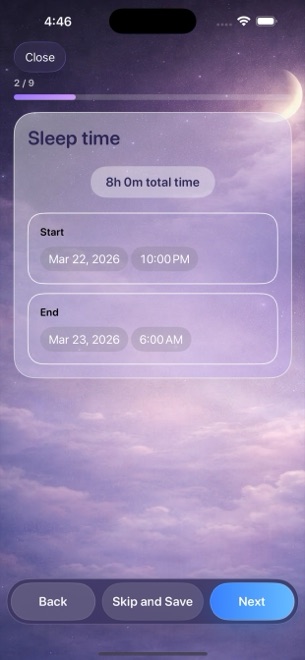
Dreams Calendar’s step-by-step wizard removes structural decisions completely. Tapping the optional morning reminder opens straight into a predictable sequence where each screen asks one small question — and every single step can be skipped if your memory is fuzzy.
| Morning friction point | Step-by-Step Wizard (Dreams Calendar) | Blank-Page Note / Diary |
|---|---|---|
| Opening from morning reminder | 1 tap opens directly into new entry wizard | Opens folder list; create & title note manually |
| Decision load while half-awake | One clear question per screen | Empty white box demanding prose |
| Capturing emotions quickly | Tap any of 30 positive & negative emotion chips | Think up adjectives & type them out |
| Consistent 1–10 sleep & energy scales | Each value shows a 1-line description as you pick it | Unrated or inconsistently described in text |
| Mornings with zero dream recall | 10-second log of sleep hours, quality & energy keeps habit alive | Blank note gets abandoned; habit breaks after 3 days |
2. What structured capture unlocks thirty days later
Freeform prose is wonderful for rich storytelling, and Dreams Calendar still gives you an unrestricted free-text dream diary inside the wizard for scenes, dialogue and anchor keywords ("flooded station, green coat").
Because that free text sits alongside structured sleep windows, latency minutes, awakenings, nightmare counts and standardized emotion chips, thirty mornings of 60-second entries automatically generate six navigable calendar views and 10 interactive Swift Charts — something thirty paragraphs of plain prose can never plot.
| After 30 mornings | Dreams Calendar (Wizard + Diary) | Blank-Page Journaling |
|---|---|---|
| Visual sleep hours across the week | Violet sleep blocks drawn over real hours in Multi-day view | Text timestamps buried inside paragraphs |
| Sleep latency, awakenings & energy trends | 5 automatic Swift Charts filterable by date range | No quantitative trend lines |
| Nightmare & dream recall frequency | Dedicated Dream Logs/Week & Nightmares/Day charts | Requires manual counting |
| Sleep quality vs emotional tone | Scatter plot of sleep quality vs emotion balance | Subjective memory only |
| Evening & daytime connection | Matching 5-question Day Reflection & Day Dream wizards | Unstructured entries |
3. Keeping the routine sustainable, private and free
The best dream journal is the one you still open in month four. Keeping every step optional, limiting notifications to a single configurable daily reminder, never interrupting an active wizard with ads, and storing everything locally in SwiftData with zero accounts removes every common reason people quit.
Whether you write three keywords or three paragraphs on a given morning, Dreams Calendar saves your entry locally on iPhone or iPad for $0.
| Moment | Recommended 60-second action in Dreams Calendar | Why it works |
|---|---|---|
| Before turning off the light | Optional 5-question Day Reflection + emotion chips | Clears mental loops & anchors daytime context on timeline |
| First 30 seconds after waking | Stay still with eyes closed; recall 2–3 anchor nouns | Protects fragile short-term memory trace |
| Seconds 30–90 in bed | Tap reminder → jot keywords, tap emotions & sleep scales → save | Locks in both narrative fragments & structured chart signals |
| Sunday evening (2 minutes) | Scan Multi-day view & Statistics tab | Reinforces dream-sign recognition without AI guesswork |
Can I still write long, detailed dream stories inside Dreams Calendar’s wizard?
Yes. The dream diary step is an unrestricted free-text field — write three quick keywords at 6:45 AM or several paragraphs whenever a dream is vivid.
What if I only remember an emotion and zero dream images?
Skip the dream text step, tap the emotion chips that lingered upon waking, rate your sleep window and energy, and save.
Does an ad ever slow down opening the wizard in the morning?
Never while writing. Occasional AdMob interstitials only appear after roughly ten view switches or two saved entries.
Where are my morning wizard entries stored?
100% locally in SwiftData on your iPhone or iPad, with no account, no cloud sync and no export in v1.1.