Dreams Calendar vs Obsidian Daily Notes: tap-friendly morning wizard & Swift Charts vs Markdown vaults
Both Dreams Calendar and Obsidian respect local-first data ownership with no mandatory account. Obsidian gives technical writers plain-text Markdown files, backlinks and plugin scripting, whereas Dreams Calendar gives iPhone and iPad sleepers a zero-setup morning wizard, six calendar timelines and 10 ready-made Swift Charts without writing YAML frontmatter or Dataview queries.
1. Tap-first bedside wizard vs typing YAML properties half-asleep
Tracking sleep latency, awakenings, nightmares and emotions in Obsidian Daily Notes requires maintaining Templater scripts and typing exact YAML/Properties syntax on a phone keyboard at 7:00 AM. One mistyped property name or inconsistent emotion tag silently breaks your downstream queries.
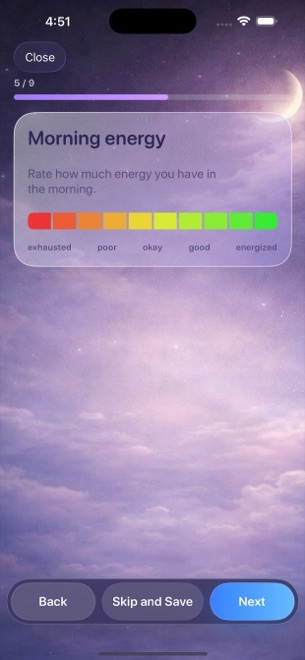
Dreams Calendar ships with that domain model already built natively for touch: tap Night Dream, Day Dream or Day Reflection, slide or tap 1–10 sleep quality stars and morning energy segments, tap counters for latency, awakenings and nightmares, write your dream text and tap from 30 standardized emotion chips.
| Dimension | Dreams Calendar (v1.1) | Obsidian Daily Notes |
|---|---|---|
| Initial configuration | Zero setup — install & tap Add | Configure vault, Daily Notes, templates, properties & community plugins |
| Morning sleep & emotion entry | Native touch controls, stars, counters & 30 emotion chips | Mobile Markdown editor & property fields |
| Visual hour-by-hour sleep timeline | Built-in Day & Multi-day views draw sleep over real hours | Requires third-party calendar/day-planner plugins |
| Built-in statistical charts | 10 interactive Swift Charts out of the box | Requires community chart/Dataview plugins & query code |
| Backlinks & knowledge graph | Not a wiki/PKM tool | Industry-leading Markdown [[wikilinks]] & graph view |
2. Local SwiftData vs plain-text Markdown files: honest trade-offs
Obsidian’s greatest strength is file longevity: every note is a `.md` file in a folder you can back up, grep, sync via iCloud Drive or Obsidian Sync, and read on Mac, Windows, Linux or mobile decades from now.
Dreams Calendar also stores 100% of entries locally on your device (in Apple SwiftData, with zero app network calls and no account), maximizing bedside simplicity on iOS 18 and iPadOS 18. However, v1.1 stores entries inside the app sandbox without Markdown/CSV export or cross-device sync, so file-portability purists should weigh that difference directly.
| Technical factor | Dreams Calendar (v1.1) | Obsidian |
|---|---|---|
| On-device storage format | Local SwiftData database inside iOS app sandbox | Plain-text `.md` files in local folder |
| Mandatory cloud account | None | None (account only for paid Obsidian Sync/Publish) |
| File export / raw access | No export in v1.1 (protected by iOS device backup) | Direct filesystem access & plain Markdown |
| Cross-device sync | None in v1.1 | Via iCloud folder, Git or paid Obsidian Sync |
| App lock on iPhone | iOS 18 native Home Screen Require Face ID | iOS 18 native Require Face ID (no built-in vault encryption) |
3. Cost and choosing between zero-maintenance charts and a PKM vault
Obsidian is free for personal use (with optional paid Sync), and Dreams Calendar is 100% free with zero in-app purchases (supported by occasional AdMob interstitials after ~10 view switches or ~2 saved entries, never mid-wizard).
Many Obsidian users still keep Dreams Calendar on their nightstand because tapping a native wizard in bed takes 45 seconds instead of debugging mobile plugins before coffee.
| Scenario | Dreams Calendar | Obsidian Daily Notes |
|---|---|---|
| App cost | $0 (free with occasional non-interrupting AdMob ads) | $0 personal use ($4–$8/mo optional Obsidian Sync) |
| Maintenance overhead | Zero — charts & calendar views never break | Plugin updates, template tweaks & mobile sync conflicts |
| Best for plain-text archival & desktop linking | No export or desktop app in v1.1 | Unbeatable plain-text ownership |
| Best for effortless iPhone/iPad sleep & dream charts | Purpose-built 6 views + 10 Swift Charts | High setup & morning typing friction |
Does Dreams Calendar export entries to Markdown for Obsidian?
Not in version 1.1. Entries remain in the local SwiftData store and are browsed across the six built-in views.
Does Dreams Calendar phone home or upload analytics about my notes?
No. The app’s own code makes zero network requests; only the AdMob SDK connects to serve occasional non-personalized ads.
Which 10 charts come prebuilt in Dreams Calendar?
Five sleep trend charts (quality, duration, latency, awakenings, morning energy), two emotion frequency charts, dream logs per week, nightmares per day and sleep quality vs emotion balance.
Does Dreams Calendar have a daily reminder to open a new note?
Yes — one configurable daily notification (8:30 AM default) that launches directly into a new entry wizard.