Dreams Calendar vs DreamBook: zero-account local SwiftData vs mandatory cloud account dream logs
Account-based apps like DreamBook organize dream stories inside a cloud-synced notebook behind an email registration and passcode screen. Dreams Calendar removes the registration wall completely on iPhone and iPad: tap Add on your very first morning, log sleep hours, dreams, emotions and evening reflections locally in SwiftData, and explore 10 Swift Charts for free.
1. Zero-friction first morning vs mandatory account onboarding
When you download a dream app at bedtime or right upon waking, being greeted by email verification, password rules and profile setup kills momentum before you write a single line. Cloud dream books require that account layer because entries live on a central server.
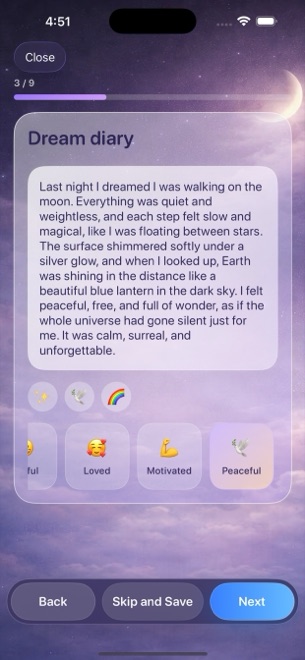
Dreams Calendar opens straight to your calendar. Tapping Add launches a calm step-by-step wizard for Night Dreams, Day Dreams or five-question Day Reflections — with every step optional so you can save fragments in under a minute.
| Feature | Dreams Calendar (v1.1) | DreamBook / Cloud Dream Notebooks |
|---|---|---|
| First-launch sign-up wall | None — open and log immediately | Account registration required for cloud journal |
| Entry types | Night dreams, daydreams & 5-question day reflections | Dream text entries with tags, avatars or themes |
| Sleep & morning metrics | Sleep window, 1–10 quality, 1–10 energy, latency, awakenings, nightmares | Primarily text narrative, date & custom tags |
| Views included | Month, Day, Year, Multi-day real-hour blocks, List, Statistics | Chronological feed, search & tag filters |
| Statistical charts | 10 interactive Swift Charts computed locally | Basic entry counts or tag summaries |
2. Local SwiftData control vs cloud sync convenience
Choosing between Dreams Calendar and a cloud dream book comes down to where you want your diary stored. DreamBook syncs entries to an online account so you can log in from another device if you lose your phone.
Dreams Calendar keeps every byte of your entries inside local SwiftData on one iPhone or iPad, making zero network calls from its own code. Version 1.1 does not sync across devices, does not export CSV/PDF files and leaves app-icon locking to iOS 18’s native Require Face ID feature — giving you total offline isolation as long as you maintain standard iPhone backups.
| Dimension | Dreams Calendar (v1.1) | DreamBook |
|---|---|---|
| Storage engine | On-device Apple SwiftData | Remote server database + local cache |
| Server breach exposure for entries | Zero — no server copy exists | Depends on cloud provider security |
| Cross-device sync | Not supported in v1.1 | Supported via account login |
| Data recovery if phone is lost | Standard encrypted iOS / Mac device backup | Sign back into cloud account |
| Biometric / PIN lock | iOS 18 native Home Screen Require Face ID | In-app PIN / biometric lock |
3. Unlimited entries and charts at $0
Some cloud dream notebooks cap free entries, restrict search filters or charge subscriptions to maintain server storage. Dreams Calendar has no entry limits, no paid tier and no in-app purchases.
Occasional Google AdMob full-screen ads support the app — appearing only after roughly ten view switches or two saved entries and never while writing inside the wizard.
| Criterion | Dreams Calendar | DreamBook |
|---|---|---|
| Cost for unlimited entries & all charts | $0 (100% free) | Freemium or paid unlock/subscription for full features |
| Ads during writing | Never | Varies by tier |
| Languages localized | 7 languages (EN, BG, DE, ES, FR, IT, RU) | Select languages |
| Best fit | No-account privacy + sleep & emotion Swift Charts | Users who want login-based cloud sync |
Do I ever need an email address to use Dreams Calendar?
Never. Dreams Calendar has no account system at all.
How do I keep my dreams backed up if Dreams Calendar has no cloud account?
Keep standard encrypted iPhone or iPad backups enabled (via Finder/Mac or iOS device backup), since entries live solely on your device.
Can I edit or delete an old dream entry later?
Yes. Every entry can be edited or deleted individually from Day, Multi-day, Month or List view, and local charts update immediately.
Does Dreams Calendar track daytime reflections too?
Yes. Alongside Night Dreams, you can log timestamped Day Dreams and five-question evening Day Reflections on the same calendar.