Dreams Calendar vs Notion dream templates: instant offline bedside wizard vs cloud database properties
Notion dream-journal templates look impressive on a desktop monitor with custom select properties, relation rollups and gallery covers, yet opening a heavy cloud workspace on an iPhone at 6:50 AM often means loading spinners, tiny property rows and lost dream recall. Dreams Calendar launches instantly offline on iOS 18, walks through a thumb-friendly bedside wizard and draws 10 native Swift Charts with zero template maintenance.
1. Bedside mobile speed in the first 90 seconds of waking
Fragile REM recall fades rapidly while your brain switches into daytime executive mode. In Notion on mobile, creating a database row, scrolling through ten small property fields (date, multi-select tags, number inputs, relations) and waiting for cloud sync demands far too much awake precision.
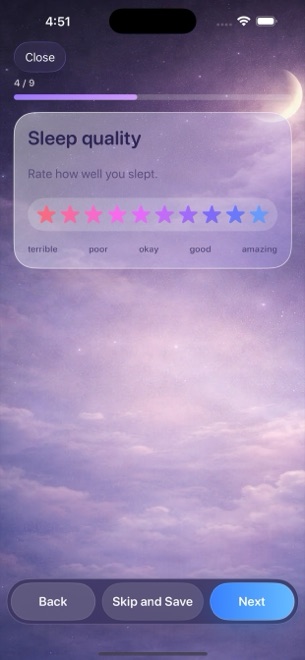
Dreams Calendar is a native SwiftUI and SwiftData iOS app built specifically for sleepy thumbs: large 1–10 star and energy controls with one-line descriptions, simple counters for latency, awakenings and nightmares, free-text notes and 30 tappable emotion chips.
| Experience factor | Dreams Calendar (v1.1) | Notion Dream Journal Template |
|---|---|---|
| Morning launch & responsiveness | Instant native iOS 18 offline launch | Web-wrapped workspace; slower cold start & sync checks |
| Setup time required | 0 minutes — 3 wizards, 6 views & 10 charts ready immediately | Buy or build database schemas, relations & formulas |
| Input ergonomics on iPhone | One question per screen with large tappable chips & stars | Dense mobile property list above page body |
| Real-hour sleep timeline | Night dreams drawn across actual sleep hours on Day/Multi-day views | Notion Calendar shows date cards unless timestamps are hand-entered |
| Daydreams & evening reflections | Built-in Day Dream & 5-question Day Reflection wizards | Requires building separate templates & filtered views |
2. Built-in Swift Charts vs Notion chart limits, plus privacy differences
Notion’s free plan restricts native database charts (typically limiting you to one chart across a workspace unless you pay for Notion Plus), pushing template users toward clunky formula progress bars. Dreams Calendar includes all 10 interactive Swift Charts for free — including a scatter plot of sleep quality against emotion balance.
Privacy differs sharply too: Notion stores workspace pages on cloud servers tied to your account (without end-to-end encryption), whereas Dreams Calendar stores entries strictly in local SwiftData on your device with zero app network calls. Conversely, Notion wins if you require desktop web editing, CSV/Markdown export or multi-device sync, which Dreams Calendar v1.1 omits.
| Dimension | Dreams Calendar (v1.1) | Notion Dream Template |
|---|---|---|
| Included native charts | 10 interactive Swift Charts unlocked free | Free plan limits native charts; Notion Plus subscription for unlimited |
| Offline reliability in Airplane Mode | 100% offline read, write & chart computation | Requires network for reliable database sync & search |
| Where dream prose is stored | On-device SwiftData only (no account, no server) | Notion cloud servers under user account |
| Desktop / web access & CSV export | iPhone & iPad only; no export in v1.1 | Full Mac, Windows, Web & CSV/Markdown export |
| Biometric lock | iOS 18 native Home Screen Require Face ID | Account login / device security |
3. Cost comparison: $0 vs paid templates and workspace plans
Creator marketplaces routinely charge $10–$39 for aesthetic Notion dream-journal templates, on top of Notion Plus if you want full charting across months of sleep data.
Dreams Calendar costs $0 to install and $0 to keep using for years, funded only by occasional AdMob interstitials outside the writing flow.
| Criterion | Dreams Calendar | Notion Dream Template |
|---|---|---|
| Template + app cost | $0 (no IAPs, no subscriptions) | $0 DIY or $10–$39 paid template + optional Notion Plus |
| Ads | Occasional AdMob interstitial (never while writing) | No third-party ads |
| Best for desktop PKM & custom database tinkering | Fixed, opinionated 3-entry schema | Infinitely customizable relational tables |
| Best for actually logging every morning from bed | Fast native wizard + 1 daily reminder | High mobile friction causes habit drop-off |
Can I customize the questions or add custom columns in Dreams Calendar like Notion?
No. Dreams Calendar uses a fixed, carefully chosen set of sleep signals, 30 emotions and five reflection questions so you never spend weekends maintaining a database.
Does Dreams Calendar work on flights or in bedrooms with Wi-Fi turned off?
Yes. Every wizard, calendar view and chart works completely offline.
Are all 10 charts in Dreams Calendar free without a Plus plan?
Yes. Unlike Notion’s chart cap on free workspaces, all 10 Swift Charts in Dreams Calendar are free.
Can I export my Dreams Calendar database to Notion later?
Not automatically — version 1.1 has no CSV or Markdown export feature.