Dreams Calendar vs SHADOW (World of Dreams): strict on-device SwiftData vs global dream databases
Crowdsourced dream projects like SHADOW popularized the idea of escalating alarms paired with uploading dream logs into a shared global "world of dreams" database. Dreams Calendar is built on the exact opposite principle for iPhone and iPad: dreams are deeply personal, so every word, emotion tag and sleep rating stays 100% offline in local SwiftData on your device.
1. Private personal context vs collective global dream feeds
Global dream databases aim to aggregate thousands of strangers’ dreams by city, keyword or mood to map collective trends. While intriguing as a social experiment, knowing your entry contributes to a shared cloud dataset subtly changes how honestly you describe private fears, relationships or nightmares.
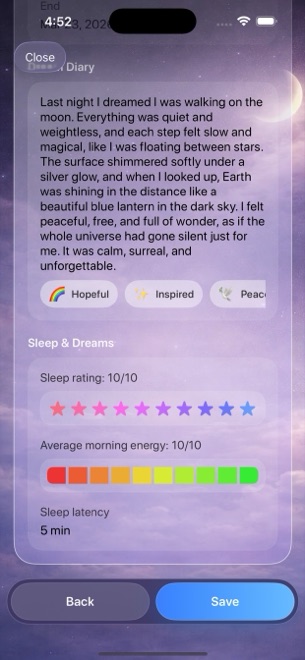
Dreams Calendar connects your dreams to the only context that actually explains them: your own sleep hours, sleep latency, awakenings, daytime thoughts and evening reflections — kept strictly for your eyes on one device.
| Design choice | Dreams Calendar (v1.1) | SHADOW / Global Dream Databases |
|---|---|---|
| Core mission | Private 24-hour calendar of your own nights & days | Crowdsourced global dream archive & community trends |
| Where entries go | Stays in local SwiftData on your iPhone or iPad | Uploaded to central cloud database |
| Wake-up prompt | 1 optional daily iOS notification (opens straight into wizard) | Escalating smart-alarm & bedside voice/text capture |
| Daytime correlation | Day Dreams + 5-question Day Reflections on same timeline | Focused on overnight dream uploads |
| App availability | Shipping v1.1 on App Store (iOS 18 / iPadOS 18+) | Many collective dream projects remained betas or shut down |
2. Zero server dependency — your journal survives offline forever
Cloud-dependent dream platforms carry a structural risk: when a startup pivots, changes terms or shuts down its backend servers, years of uploaded dream logs can become unreachable overnight.
Because Dreams Calendar’s own code makes zero network requests and depends on no developer server or user account, your calendar works identically in Airplane Mode. Just remember v1.1’s honest local trade-offs: there is no cloud sync across devices and no file export button, so keep normal encrypted iPhone backups.
| Criterion | Dreams Calendar (v1.1) | Cloud / Crowdsourced Dream Apps |
|---|---|---|
| Works 100% offline | Yes — app code makes zero network calls | Requires cloud account & server uptime |
| Account or profile required | None | Required to contribute & sync |
| Permissions requested | Optional notification permission only | Network, microphone, notifications & often location |
| Cross-device sync & export | None in v1.1 (local device only) | Server-side storage |
| Biometric lock | iOS 18 native Home Screen Require Face ID | Account login / optional passcode |
3. Local Swift Charts and $0 cost
Instead of showing what strangers dreamed about last Tuesday, Dreams Calendar plots 10 Swift Charts from your own entries: five sleep charts, positive and negative emotion rankings, weekly dream logs, daily nightmares and sleep quality versus emotion balance.
Everything in Dreams Calendar is free with no subscriptions or in-app purchases, funded by occasional AdMob interstitials outside the writing flow.
| Factor | Dreams Calendar | Global Dream Platforms |
|---|---|---|
| Price | $0 (no subscriptions, no IAPs) | Crowdfunded, freemium or subscription-backed |
| Charts included | 10 personal Swift Charts computed on device | Community word clouds & basic personal stats |
| Ads | Occasional AdMob interstitial (no ATT cross-app tracking prompt) | Varies by platform |
| Best fit | Uncensored, permanent on-device dream & sleep diary | Readers curious about public/anonymous dream feeds |
Does Arte Soft EOOD collect anonymized dream statistics from Dreams Calendar?
No. Dreams Calendar’s own code makes zero network requests; Arte Soft EOOD receives zero dream text, emotion tags or sleep ratings.
What happens to my entries if I have no internet connection on a trip?
Every wizard, calendar view and chart works completely offline because the entire SwiftData store lives on your device.
Does Dreams Calendar include an alarm clock?
It uses your normal iPhone alarm for waking and offers one optional daily reminder notification that opens straight into a new entry.
Can I share or publish an entry publicly from Dreams Calendar?
No. There are no public feeds, social profiles or share-to-community buttons.