Dreams Calendar vs Elsewhere Dream Journal: private 10-signal calendar vs AI dream art and sharing
Elsewhere turns dream entries into AI-generated artwork, symbol lookups and optional community-shared posts backed by a cloud account. Dreams Calendar takes the opposite direction on iPhone and iPad: a quiet, local-only calendar where night dreams, daydreams and evening reflections stay strictly on your device and feed 10 statistical Swift Charts for free.
1. Creative AI dream illustration vs structured 24-hour calendar
Elsewhere appeals to visual thinkers who enjoy seeing surreal dream scenes rendered as AI illustrations, browsing automatic symbol dictionaries and optionally sharing intriguing dreams with other users. Its interface centers on individual dream cards, imagery and symbolic motifs.
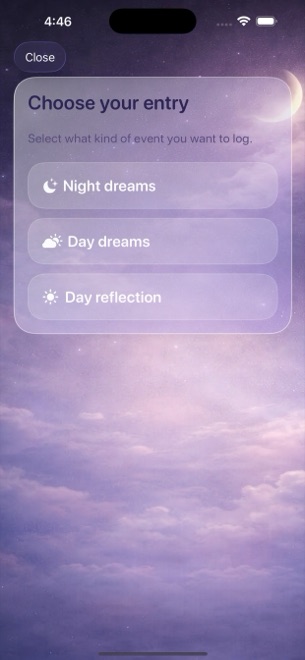
Dreams Calendar is structured around time and personal rhythm rather than generated art. Night dreams sit as violet blocks across the actual hours you slept, while daytime thoughts (Day Dreams) and evening five-question check-ins (Day Reflections) sit at their timestamps on the same Day, Multi-day, Month and Year views.
| Feature | Dreams Calendar (v1.1) | Elsewhere Dream Journal |
|---|---|---|
| Primary visual representation | 6 calendar & timeline views + 10 Swift Charts | AI-generated dream illustrations & symbol feeds |
| Entry varieties | Night dreams, daydreams & structured day reflections | Dream logs with automatic symbol & character tagging |
| Sleep mechanics tracked | Sleep window, quality (1–10), energy (1–10), latency, awakenings, nightmares | Minimal sleep tracking; narrative & imagery first |
| AI image generation & interpretation | None (text & tappable emotion chips only) | Core feature (AI art styles & AI dream readings) |
| Social / public dream feed | None (single-user private journal) | Optional community sharing & public dream browsing |
| Supported languages | 7 UI languages (EN, BG, DE, ES, FR, IT, RU) | Primarily English-led interface & symbol index |
2. Cloud account exposure vs zero-network SwiftData storage
Generating AI images and syncing a profile across devices requires sending dream text to remote servers. Even when entries are marked private inside a cloud app, knowing a remote API processes raw dream descriptions can make people self-edit sensitive or embarrassing fragments.
Dreams Calendar’s own application code makes zero network calls. Everything you type or tap lives inside an on-device SwiftData database with no login screen. Because there is no server copy and no export button in v1.1, your entries cannot leak from a cloud breach, though you should maintain normal iOS device backups if you switch phones.
| Dimension | Dreams Calendar (v1.1) | Elsewhere Dream Journal |
|---|---|---|
| Mandatory account sign-up | No account or profile | Account required for cloud storage & AI features |
| External AI API calls on dream text | Never (0 network requests by app code) | Required for AI artwork & AI interpretation |
| Multi-device cloud sync | Not supported (stays on the iPhone or iPad used) | Supported via cloud account |
| Data export | Not included in v1.1 | Account-based data management |
| System permissions | Optional daily notification only | Network, notifications & optional media saving |
3. Cost structure and who each app suits best
AI image generation and LLM interpretations carry per-request server costs, so Elsewhere rations or gates advanced generations and insights behind paid supporter/subscription tiers. Dreams Calendar runs entirely on device hardware, allowing every user to log unlimited entries and inspect all 10 charts for $0.
Choose Elsewhere when turning vivid dreams into visual art and exploring Jungian-style symbol clusters sounds fun. Choose Dreams Calendar when you want an uncoached, private record of how sleep latency, awakenings, nightmares and daytime emotions interact over months.
| Decision point | Dreams Calendar | Elsewhere Dream Journal |
|---|---|---|
| Price to unlock all features | Free ($0; occasional AdMob interstitials after ~10 view switches) | Freemium; paid subscription for expanded AI art & analysis |
| Ads during writing | Never shown while inside the entry wizard | No AdMob banners; uses subscription upsells |
| Best for visual / social dreamers | No AI art or community feed | Strong fit for AI dream illustrations & sharing |
| Best for light sleepers & pattern seekers | 5 sleep trend charts + emotion balance scatter plot | Does not chart sleep latency or morning energy |
| Platform requirement | iPhone & iPad on iOS 18 / iPadOS 18+ | iOS, Android & web access |
Does Dreams Calendar generate AI pictures of my dreams?
No. Dreams Calendar keeps entries strictly offline in SwiftData without sending your text to image or language models.
Can anyone else see my entries in Dreams Calendar?
No. There are no user profiles, social feeds or cloud servers; entries exist only on your iPhone or iPad.
How does Dreams Calendar connect dreams to daytime moods without AI?
You tap from the same 30 positive and negative emotion chips on Night Dreams, Day Dreams and Day Reflections, and Statistics plots frequency and sleep-quality correlations automatically.
What happens if I delete Dreams Calendar?
Deleting the app immediately removes its local SwiftData database because Arte Soft EOOD keeps no external copy.