Dreams Calendar vs DreamKit on iOS: clean 10-signal logging & Swift Charts vs AI art and dictionaries
DreamKit bundles a dream notebook with AI-generated dream paintings, AI symbol interpretations, dream dictionary lookups and lucid reality-check reminders. Dreams Calendar stays deliberately calm and offline on iPhone and iPad — recording night dreams, sleep quality, morning energy, daydreams and evening reflections in local SwiftData with 10 free Swift Charts.
1. Self-observed sleep & emotion signals vs AI dream horoscopes
DreamKit leans heavily on generative AI: after typing a dream, you can generate an AI artwork card, ask an AI interpreter what specific symbols mean and browse built-in dream dictionary definitions alongside lucid-dreaming reality checks.
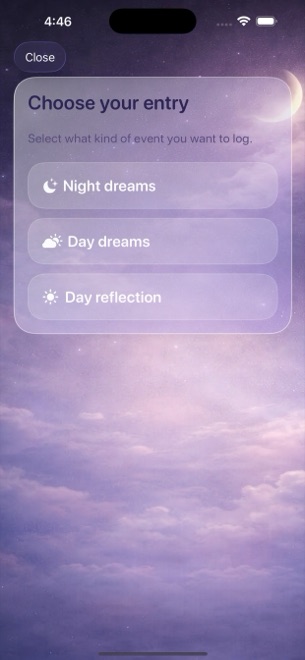
Dreams Calendar skips symbol dictionaries and AI art so your morning routine stays fast and grounded in what you actually experienced. You log your real sleep window, 1–10 sleep quality, 1–10 morning energy, latency minutes, awakenings, nightmares, free-text dream notes and 30 tappable emotion chips — plus daytime Day Dreams and evening Day Reflections.
| Capability | Dreams Calendar (v1.1) | DreamKit |
|---|---|---|
| Entry types | Night dreams, daydreams & 5-question day reflections | Dream logs with lucid & tag attributes |
| AI dream art & AI interpretation | Not included (zero cloud AI calls) | Core feature (AI dream images & AI analysis) |
| Built-in dream symbol dictionary | Not included | Included for common dream motifs |
| Lucid reality-check reminders | Not included (1 optional daily reminder only) | Included for lucid-dream training |
| Sleep & daytime pattern tracking | 7 sleep metrics + 30 shared emotion chips across day & night | Centered on dream text, tags & lucidity |
| Calendar & timeline views | 6 views: Month, Day, Year, Multi-day sleep blocks, List, Statistics | Card feed & calendar date picker |
2. Offline SwiftData privacy vs cloud AI processing
Sending dream descriptions to cloud image generators and LLM interpreters means transmitting raw personal text off your phone. Dreams Calendar keeps 100% of your entries inside a local SwiftData database on your iPhone or iPad with no account registration and zero network requests in the app’s own code.
Be clear on local-only limits before choosing: Dreams Calendar v1.1 has no cloud backup, no multi-device sync and no file export button, and relies on iOS 18’s native Require Face ID if you want an app lock. DreamKit offers cloud-backed features and built-in passcode options.
| Privacy or storage detail | Dreams Calendar (v1.1) | DreamKit |
|---|---|---|
| Account sign-in | None | Optional/cloud account for backup & AI credits/tiers |
| Dream text sent over network | Never | Sent when generating AI interpretations or AI art |
| Multi-device sync & export | None in v1.1 | Cloud backup options available |
| Passcode / Face ID | Via iOS 18 Home Screen Require Face ID | In-app passcode lock |
| UI localization | 7 languages (EN, BG, DE, ES, FR, IT, RU) | Multi-language mobile support |
3. Ten free Swift Charts without AI token limits or subscriptions
Apps that generate cloud AI images and interpretations naturally meter usage with credit limits, ad-watch unlocks or recurring Pro subscriptions. Because Dreams Calendar runs locally on your Apple silicon chip, nothing is metered.
All six views and all 10 interactive Swift Charts — including sleep quality versus emotion balance — are completely free, supported only by occasional AdMob full-screen ads outside the writing wizard.
| Factor | Dreams Calendar | DreamKit |
|---|---|---|
| In-app purchases or subscriptions | None ($0 for every feature) | Freemium with paid tiers/unlocks for expanded AI & pro tools |
| Charts & statistics | 10 interactive Swift Charts unlocked from install | Tag/lucid stats; AI insights tied to cloud features |
| Ads while typing a dream | Never shown inside the entry wizard | Ad/upgrade prompts vary by tier |
| Best fit | Grounded sleep, dream & daily reflection tracking offline | AI dream illustrations, symbol lookups & reality checks |
Why doesn’t Dreams Calendar include a dream symbol dictionary?
Fixed symbol dictionaries treat a dog or an ocean the same for every person; tracking your own emotions and daytime reflections shows what recurring themes actually link to in your life.
Are there daily limits on how many dreams or reflections I can log?
None. You can save unlimited Night Dreams, Day Dreams and Day Reflections for free.
Can I inspect exact dates on the charts in Dreams Calendar?
Yes. Filter any of the 10 Swift Charts by Month, Year, Custom range or All time, and drag across the chart to read specific values.
Does Dreams Calendar require iOS 18?
Yes. Dreams Calendar v1.1 runs natively on iPhone and iPad with iOS 18 / iPadOS 18 or later.