Dreams Calendar vs Capture Dream Journal: 6-view sleep & reflection calendar vs minimalist dream notes
Minimalist dream-capture apps like Capture focus on getting a quick voice or text dream memo down at bedside and tagging basic themes. Dreams Calendar keeps morning capture fast via a skippable wizard while adding what single-purpose note apps omit: real-hour sleep timelines, daydreams, five-question evening reflections and 10 interactive Swift Charts at $0.
1. Quick bedside notes vs a full 24-hour calendar timeline
Minimalist dream recorders prioritize a single button for jotting or dictating last night’s dream into a chronological list. That simplicity gets words saved quickly, yet weeks later a flat list of morning notes cannot show whether vivid dreams clustered around short sleep windows, long sleep latency or difficult workdays.
Dreams Calendar pairs fast bedside entry with six dedicated calendar views: Month, Day, Year, Multi-day (drawing night dreams across actual sleep hours and daytime entries at their recorded time), List and Statistics.
| Feature | Dreams Calendar (v1.1) | Capture / Minimalist Dream Notes |
|---|---|---|
| Entry types | Night dreams, daydreams & 5-question day reflections | Overnight dream notes only |
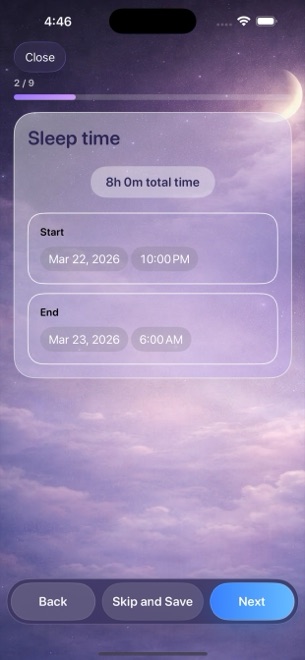
| Morning capture speed | Step-by-step wizard; skip any step & save in seconds | Single-screen text or voice note |
| Audio file recording | No microphone permission; uses iOS keyboard dictation if wanted | Often includes built-in voice memo recording |
| Sleep metrics per night | Sleep start/end, 1–10 quality, 1–10 energy, latency, awakenings, nightmares | Optional tags or none |
| Browsing layouts | Month, Day, Year, Multi-day timeline, List & Statistics | Chronological list & tag search |
2. Structured emotion chips and 10 Swift Charts
Instead of asking you to invent ad-hoc hashtags half-asleep, Dreams Calendar places 30 consistent emotion chips (15 positive, 15 negative) right under the text box across all three entry wizards.
Those structured taps power 10 local Swift Charts in Statistics: five sleep trend graphs, most frequent positive and negative emotions, weekly dream counts, daily nightmare counts and a scatter plot comparing sleep quality with emotion balance.
| Capability | Dreams Calendar (v1.1) | Capture / Minimalist Dream Notes |
|---|---|---|
| Statistical charts | 10 interactive Swift Charts (Month, Year, Custom range, All time) | Entry counts or basic tag tallies |
| Sleep-to-emotion correlation | Built-in scatter chart (sleep quality vs emotion balance) | Not available |
| Account & storage | No account; 100% local SwiftData on iPhone/iPad | Varies (local or cloud account backup) |
| Export & multi-device sync | None in v1.1 | Varies by app |
| App lock | iOS 18 native Home Screen Require Face ID | Optional passcode lock on some apps |
3. Pricing and choosing between voice memos and structured charts
If your main habit is whispering a three-minute audio recording in the dark with your eyes shut and replaying the raw audio later, pick an app with dedicated voice-memo storage (or Apple Voice Memos).
If you want readable text entries, tappable emotions, sleep-latency tracking and 10 charts without ever hitting a subscription paywall, Dreams Calendar includes the entire toolkit free on iOS 18 and iPadOS 18.
| Decision factor | Dreams Calendar | Capture / Voice-Note Dream Apps |
|---|---|---|
| Price | $0 (free; occasional AdMob interstitials outside wizard) | Free limited tier or paid Pro unlock/subscription |
| Interruptions while writing | Zero ads shown mid-entry | Depends on tier / character limits |
| Best for stored raw audio recordings | Does not record audio files | Designed for bedside audio clips |
| Best for visual sleep & emotion trends | 6 calendar views + 10 Swift Charts free | Minimal charting |
Can I still speak my dream into Dreams Calendar instead of typing?
Yes — tap the microphone key on the standard iOS keyboard during the dream diary step to use Apple’s built-in dictation into the text field.
Does Dreams Calendar limit entry length?
No. Free-text dream diaries, daydreams and reflection answers have no paywalled word limits.
How many views can I switch between in Dreams Calendar?
Six: Month, Day, Year, Multi-day timeline, List and Statistics.
Are my entries backed up to a cloud server?
No. Everything remains in local SwiftData on your device; standard iOS device backups protect your data when upgrading phones.