Dreams Calendar vs a paper bedside dream diary: 10 Swift Charts & 6 views vs pen and notebook
A clothbound notebook and pen beside the bed offer zero screen glare, sketchable margins, zero ads and multi-decade shelf life with no software updates. Dreams Calendar wins on the three hurdles that make most paper dream diaries collect dust by week three: writing legibly in a dark bedroom, finding old entries across months, and turning daily sleep and emotion notes into 10 automatic Swift Charts.
1. Writing at 6:30 AM: lamp light & cramping hands vs a guided wizard
Paper dream journals look romantic until you wake from a vivid dream before sunrise: turning on a bedside lamp wakes your partner and shocks your eyes, while scribbling in the dark produces illegible lines and skips sleep details.
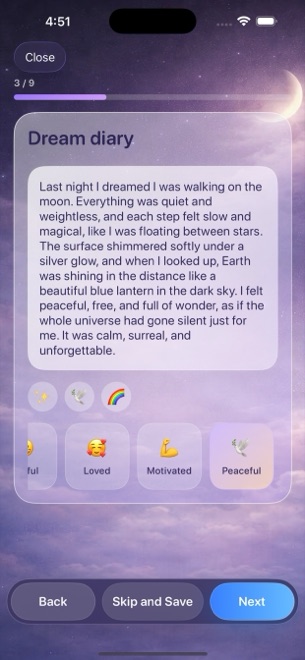
Dreams Calendar guides sleepy mornings one calm screen at a time on your dimmed iPhone: tap your sleep hours, 1–10 quality stars, 1–10 morning energy, latency, awakenings and nightmares, jot or dictate key dream phrases, and tap from 30 emotion chips without uncapping a pen.
| Factor | Dreams Calendar (v1.1) | Paper Bedside Notebook |
|---|---|---|
| Logging in a dark bedroom | Backlit iOS screen; tap chips & scales in under 60 seconds | Requires turning on a lamp or writing blind |
| Morning habit cue | 1 optional daily reminder notification opening straight into wizard | Visual cue of notebook on nightstand only |
| Freehand dream sketches & diagrams | Not supported (text & structured taps) | Draw room layouts, symbols & margins freely |
| Consistent sleep & emotion data | Prompted automatically (7 sleep signals + 30 emotion chips) | Easy to forget rating scales on groggy mornings |
| Entries when traveling or commuting | Always in your pocket for Day Dreams & evening reflections | Left at home unless carried in a bag |
2. Privacy on a nightstand vs local SwiftData + Face ID
Paper never connects to the internet — and neither does Dreams Calendar’s own journal code, which stores everything locally in SwiftData on your device with zero accounts or cloud servers. Yet a physical notebook sitting on a bedside table or hotel desk can be opened and read by anyone walking into the room.
On iOS 18, long-pressing the Dreams Calendar icon to enable Require Face ID keeps your diary locked behind Apple’s biometric authentication while preserving local-only storage. On the flip side, a paper notebook never gets erased if a phone breaks without an iOS backup, whereas Dreams Calendar v1.1 has no export or cloud sync.
| Dimension | Dreams Calendar (v1.1) | Paper Bedside Notebook |
|---|---|---|
| Cloud exposure | Zero — local SwiftData on device | Zero — physical ink on paper |
| Protection from curious housemates | Lockable via iOS 18 native Require Face ID | Readable by anyone unless locked in a drawer |
| Browsing & looking back | 6 views: Month, Day, Year, Multi-day, List & Statistics | Flipping pages manually; no instant timeline switch |
| Backup & archival risk | Requires standard iOS device backup; no export in v1.1 | Vulnerable to loss/water, immune to OS upgrades |
3. Automatic 10 Swift Charts vs flipping through 200 handwritten pages
Even disciplined notebook keepers rarely tally 180 handwritten pages to see whether nightmare spikes follow high sleep latency or which five emotions dominated winter.
Dreams Calendar plots all 10 interactive Swift Charts automatically for $0 (with occasional AdMob interstitials outside the writing screens, versus the ~$15–$25 cost of each new hardcover notebook).
| Capability | Dreams Calendar | Paper Bedside Notebook |
|---|---|---|
| Cost | $0 (free; occasional AdMob interstitials) | $10–$25 per notebook + pens (zero ads) |
| Sleep & emotion trend charts | 10 interactive Swift Charts (filter by Month, Year, Range, All time) | None unless transcribed into a spreadsheet |
| Sleep quality vs emotion correlation | Instant scatter plot in Statistics | Manual guesswork |
| Best combined workflow | Daily metrics, searchable calendar & evening check-ins | Occasional deep sketches beside the bed |
Is Dreams Calendar as offline as a paper notebook?
For your entries, yes: the app’s own code makes zero network requests and keeps everything in local SwiftData (only Google AdMob uses the network to serve occasional non-personalized ads).
How can I keep someone who borrows my phone from reading my dream diary?
Long-press the Dreams Calendar icon on your iOS 18 Home Screen and tap Require Face ID.
Can I print my Dreams Calendar entries into a physical notebook?
Not directly — version 1.1 does not include a print or PDF export option.
What if some mornings I am too sleepy to write full sentences?
Every wizard step is optional: tap your sleep hours, quality stars and two emotion chips in ten seconds and go on with your morning.