Dreams Calendar vs Sleep Cycle: remembering dreams & daily emotions vs bedside microphone snore alarms
Sleep Cycle turns your bedside iPhone into an overnight microphone listener and smart alarm that estimates movement, snoring and wake-up windows on a freemium subscription. Dreams Calendar never listens to your bedroom: you wake normally, take sixty seconds in an offline wizard to record your dream, sleep quality, morning energy and emotions, and explore 10 free Swift Charts.
1. Bedside audio monitoring vs morning dream & reflection capture
Sleep Cycle requires leaving the app active overnight with your iPhone plugged in beside the bed so its microphone (or accelerometer) can detect breathing shifts, snoring, coughing and sleep talking — then wake you inside a 30-minute light-sleep window. However, waking from a smart alarm still leaves you with nowhere structured to write what you dreamed or connect last night to how yesterday went.
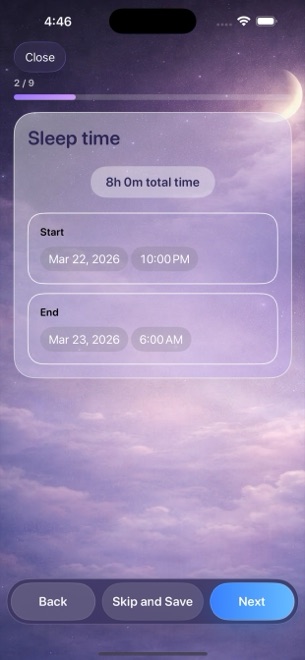
Dreams Calendar needs zero overnight battery drain or microphone listening. When you wake, tap your single optional reminder (or open the app), log your Night Dream window, 1–10 quality, 1–10 morning energy, latency, awakenings, nightmares, dream text and 30 emotion chips — plus daytime Day Dreams and evening five-question Day Reflections.
| Feature | Dreams Calendar (v1.1) | Sleep Cycle |
|---|---|---|
| Overnight microphone / motion listening | None — app stays closed overnight | Continuous overnight microphone or motion analysis |
| Smart phase wake-up alarm | Not an alarm clock (1 optional morning reminder) | Core 30-minute wake-up window smart alarm |
| Snore, cough & sleep-talk audio clips | Not included | Included (full audio & trends require Premium) |
| Dream diary & nightmare tracking | Full free-text dream diary + nightmare counter + 30 emotions | Minimal sleep notes only |
| Daytime & evening context | Day Dreams + 5-question Day Reflections on same timeline | Optional quick pre-sleep checkboxes (Premium) |
| Calendar & timeline views | 6 views: Month, Day, Year, Multi-day sleep blocks, List, Statistics | Nightly graph & sleep regularity screens |
2. Zero bedroom audio permissions and local SwiftData privacy
Many couples, travelers and privacy-conscious sleepers are uncomfortable running an open microphone next to their pillow for eight hours every night or syncing sleep telemetry to an online account.
Dreams Calendar asks only for optional notification permission. Its own code makes zero network requests, creates no user account and stores every entry locally in SwiftData on your iPhone or iPad (with honest v1.1 trade-offs: no cloud sync and no file export).
| Criterion | Dreams Calendar (v1.1) | Sleep Cycle |
|---|---|---|
| Microphone & HealthKit permissions | Never requested | Microphone required for sound tracking; optional HealthKit |
| Overnight charger requirement | None — zero overnight battery use | Recommended plugged in beside bed all night |
| Account & cloud storage | No account; 100% local SwiftData on device | Account login & cloud online backup |
| Partner / pet noise distortion | Unaffected — you rate your own sleep directly | Shared beds, fans or pets can skew microphone readings |
| App lock | iOS 18 native Home Screen Require Face ID | Account / OS device lock |
3. Free long-term charts vs yearly Sleep Cycle Premium
Sleep Cycle’s free tier handles basic alarm and nightly graphs, while locking multi-month trend comparisons, sleep notes, snore recordings and weather/mood factors behind an annual Sleep Cycle Premium subscription.
Dreams Calendar unlocks all 10 interactive Swift Charts — across Month, Year, Custom range and All time — for $0 with zero subscriptions, supported by occasional AdMob interstitials outside the writing screens.
| Decision point | Dreams Calendar | Sleep Cycle |
|---|---|---|
| Long-term trend charts cost | $0 (all 10 Swift Charts free forever) | Multi-month trends & notes gated by annual Premium |
| Best for checking if you snore or talk in sleep | No audio recording | Built for overnight sound detection |
| Best for remembering dreams & linking days to nights | Dedicated Night Dream + Day Reflection calendar | Does not capture dream narratives or evening reviews |
Does Dreams Calendar listen through my iPhone microphone at night?
Never. Dreams Calendar does not request microphone permission and runs zero background tasks while you sleep.
Can I use my normal iPhone Sleep Focus alarm with Dreams Calendar?
Yes — wake with Apple’s built-in alarm, then tap Dreams Calendar’s optional morning reminder to log your night in sixty seconds.
Does sharing a bed or running a fan affect Dreams Calendar?
Not at all, because you log your own perceived sleep window, latency, awakenings and morning energy manually.
Are multi-year sleep charts paywalled in Dreams Calendar?
No. Year, custom-range and all-time chart filters are 100% free.