Dreams Calendar vs Oniri on iPhone: free on-device dream calendar vs AI dream interpretation subscription
Oniri is built for dreamers who want AI-generated dream interpretations, a symbol dictionary, voice-note recording and lucid-dreaming guides backed by an optional Pro subscription. Dreams Calendar is a 100% free, local-only iPhone and iPad calendar that logs night dreams, daydreams and evening reflections in a skippable wizard and plots 10 Swift Charts with zero accounts and zero AI guesswork.
1. Morning capture workflow and daytime context
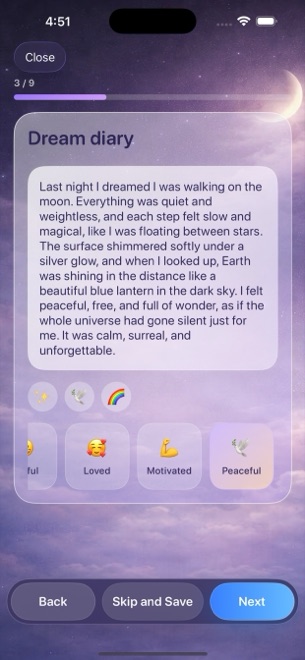
Oniri centers each entry on dream prose or voice dictation, then offers AI chat readings and dictionary symbol lookups to suggest what a dream might mean. Dreams Calendar treats dreams as one part of a 24-hour personal calendar: Night Dreams record your sleep window and seven sleep signals, Day Dreams capture daytime thoughts or visualizations, and Day Reflections walk through five evening questions.
Instead of interpreting symbols for you, Dreams Calendar uses 30 consistent emotion chips (15 positive and 15 negative) across all three entry types so you can observe how daytime friction and overnight rest actually line up on Month, Day, Year and Multi-day views.
| Capability | Dreams Calendar (v1.1) | Oniri |
|---|---|---|
| Entry types supported | Night dreams, daydreams & 5-question day reflections | Dream journal entries with lucid & theme tags |
| Morning capture format | Step-by-step wizard (every step skippable) + free text | Text editor or built-in voice recording + tags |
| Sleep metrics logged | Sleep window, 1–10 quality, 1–10 energy, latency, awakenings, nightmares | Basic sleep/dream tags; focused on dream narrative |
| Emotion tracking | 30 tappable chips (15 positive, 15 negative; multi-select) | Emotion and theme tags tied to dream dictionary |
| AI dream interpretation & symbol dictionary | Not included by design (no AI symbol readings) | Core feature (unlimited readings require Oniri Pro) |
| Lucid-dreaming reality-check trainers | Not included | Included alongside lucid guides and techniques |
2. Privacy architecture, backups and honest limits
Dreams Calendar stores every entry inside a local SwiftData database on your iPhone or iPad. The app’s own code makes zero network requests, requires no sign-up and never uploads dream prose to a cloud model. Only Google AdMob uses the network for occasional interstitial ads, and your written entries are never part of that.
That strict local boundary comes with clear trade-offs: version 1.1 of Dreams Calendar has no cloud sync between iPhone and iPad, no CSV/PDF export button and no built-in PIN screen (though you can lock the app with iOS 18’s native Home Screen Require Face ID setting). Oniri offers internal passcode lock, cloud backup and export options when you want multi-device continuity.
| Privacy or storage dimension | Dreams Calendar (v1.1) | Oniri |
|---|---|---|
| Account or email sign-up | None | Account used for cloud backup & cross-device sync |
| Where dream text is processed | 100% on-device SwiftData; never sent to external servers | Cloud servers when using sync or AI interpretation |
| System permissions requested | Optional notifications only (1 configurable daily reminder) | Notifications, microphone (for voice notes) & network |
| App lock options | Use iOS 18 native Require Face ID (no internal PIN) | Built-in passcode / Face ID lock |
| File export & multi-device sync | None in v1.1 (protected via standard iOS device backup) | Cloud sync & export supported |
3. Pricing and long-term statistics access
Oniri lets you write basic entries for free while placing unlimited AI interpretations, deeper pattern analytics and full feature packs behind recurring Oniri Pro subscriptions or lifetime unlocks. Dreams Calendar has no paid tier and no in-app purchases at all: all six calendar views and all 10 interactive Swift Charts are unlocked from day one.
Dreams Calendar funds itself with occasional full-screen AdMob ads shown after roughly ten view switches or two saved entries — and never while you are typing inside an entry wizard.
| Cost or analytics factor | Dreams Calendar | Oniri |
|---|---|---|
| Upfront & recurring subscription cost | $0 (no subscriptions, no in-app purchases) | Freemium; recurring Oniri Pro subscription for full toolkit |
| Charts & statistics paywall | All 10 Swift Charts unlocked for every user | Full analytics & unlimited AI gated behind Pro |
| Sleep quality vs emotion correlation | Built-in scatter chart (sleep quality vs emotion balance) | Focused on recurring dream symbols, people & places |
| Advertising behavior | Occasional AdMob interstitials outside writing flow; no ATT prompt | Ad-free subscription model with upgrade prompts |
| Best fit | Private sleep-to-day calendar & charts at zero cost | Voice-recorded dreams, lucid guides & AI symbol readings |
Does Dreams Calendar interpret dream symbols with AI like Oniri?
No. Dreams Calendar avoids AI dream dictionaries and generated interpretations, focusing instead on your own logged sleep ratings, 30 emotion chips and 10 local Swift Charts.
Are any charts locked behind a Pro subscription in Dreams Calendar?
No. Dreams Calendar has zero in-app purchases; all six calendar views and all 10 charts are free for every user.
Can I record audio voice memos directly inside Dreams Calendar?
Dreams Calendar does not ask for microphone access or store audio files, though you can use standard iOS keyboard dictation in any text step of the wizard.
Will an ad interrupt me while writing down a dream before I forget it?
Never. Full-screen AdMob ads appear only occasionally after about ten view switches or two saved entries, never mid-wizard.