Dreams Calendar vs Somni Dream Journal: skippable wizard & local SwiftData vs cloud AI dream logs
Somni and modern cloud dream journals focus on account-synced dream entries paired with AI-generated theme summaries and mood insights. Dreams Calendar keeps your bedside routine completely offline in SwiftData on iPhone and iPad — combining night dreams, daydreams and five-question evening reflections with 10 transparent Swift Charts and zero subscriptions.
1. Skippable 10-signal morning wizard vs cloud text logging
Cloud dream logs typically ask you to write or dictate a narrative, mark whether it was lucid or a nightmare and wait for an AI summary to extract themes. On mornings when you wake with zero dream recall, a narrative-only app leaves nothing useful to record.
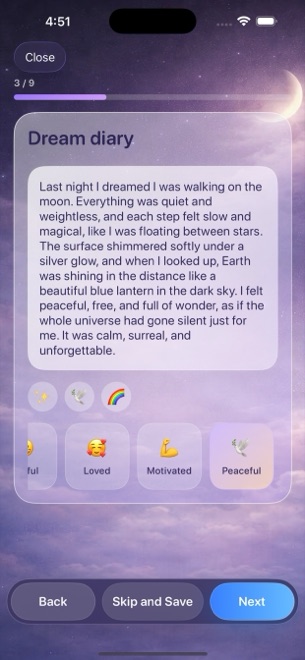
Dreams Calendar’s step-by-step Night Dream wizard still captures meaningful patterns on blank-dream mornings: you can log your sleep window, 1–10 sleep quality stars, 1–10 morning energy, latency minutes and awakenings, skip the diary text and save in ten seconds.
| Capability | Dreams Calendar (v1.1) | Somni / Cloud AI Dream Logs |
|---|---|---|
| Entries when you forget the dream | Log sleep hours, quality, energy, latency & awakenings anyway | Mostly empty without dream narrative text |
| Daydream & evening reflection support | Built-in Day Dream & 5-question Day Reflection wizards | Focused on overnight dreams only |
| Scale guidance while logging | Each 1–10 value shows a plain one-line reading as you tap | Generic tags or raw sliders |
| Emotion vocabulary | 30 fixed positive & negative chips counted across all entries | AI-inferred sentiment or freeform tags |
| Calendar views | Month, Day, Year, Multi-day sleep timeline, List & Statistics | Entry list & basic monthly dots |
2. Zero-account local SwiftData vs server-stored dream histories
Dreams contain raw anxieties, family members and private moments that many people never want stored in a startup’s cloud database or passed through third-party LLM endpoints. Dreams Calendar eliminates that hesitation: there is no login screen, no cloud database and zero network code inside the app itself.
The honest trade-off of strict device residency is that Dreams Calendar v1.1 offers no multi-device sync and no CSV/PDF export. If you switch iPhones, standard encrypted iOS device backups carry your data forward, whereas cloud apps sync via email login.
| Privacy dimension | Dreams Calendar (v1.1) | Somni / Cloud Dream Apps |
|---|---|---|
| Sign-in required | Never | Email, Apple or Google sign-in typical |
| Where entries are stored | Local SwiftData on your iPhone or iPad | Remote cloud database |
| Third-party AI processing of dream text | Zero | Used for automated theme & symbol summaries |
| Permissions requested | Optional single daily notification only | Network, notifications & optional microphone |
| Backup & lock | iOS device backup + iOS 18 native Require Face ID | Cloud account backup + optional in-app lock |
3. Transparent arithmetic in Swift Charts vs paywalled AI insights
Instead of opaque AI wellness scores behind a monthly paywall, Dreams Calendar shows exact arithmetic across 10 Swift Charts — including a scatter plot of sleep quality against emotion balance (positive chips minus negative chips).
Every chart and calendar view is 100% free with zero in-app purchases, supported by occasional AdMob full-screen ads that never appear mid-entry.
| Factor | Dreams Calendar | Somni / Cloud Dream Apps |
|---|---|---|
| Subscription cost | $0 forever (no paid tier) | Freemium with monthly/annual Pro subscriptions |
| Analytics transparency | 10 direct Swift Charts computed locally from your taps | AI-generated summaries & paywalled trend cards |
| Ad behavior | Occasional AdMob interstitial outside writing wizard | Upgrade banners or subscription gates |
| Best fit | Privacy-first sleepers & dreamers wanting 0 subscriptions | Users who prefer cloud login & AI-written dream recaps |
What if I wake up and remember nothing about my dream?
Every wizard step in Dreams Calendar is optional — you can log your sleep window, quality stars, latency and morning energy in seconds and skip the dream text.
Does Dreams Calendar upload my entries for backup or analytics?
No. The app has no server, no analytics on your text and no cloud sync; entries stay on your device.
How is emotion balance calculated without AI?
Emotion balance simply subtracts the count of negative emotion chips you tapped from the count of positive emotion chips.
Which iOS versions support Dreams Calendar?
Dreams Calendar v1.1 requires iOS 18 or later on iPhone and iPadOS 18 or later on iPad.