Dreams Calendar vs AutoSleep & Pillow: subjective dream recall & morning energy vs Apple Watch sleep stages
AutoSleep and Pillow use Apple Watch heart-rate and motion sensors (plus Apple HealthKit) to estimate REM, deep sleep and readiness rings automatically overnight. Dreams Calendar tracks what wrist sensors cannot read — what you actually dreamed, how many nightmares woke you, how rested you genuinely feel and how your daytime emotions connect — with zero wearables and zero HealthKit permissions.
1. What a watch sensor measures vs what you actually experienced
Overnight Apple Watch apps like AutoSleep and Pillow excel at passive biometric capture: heart-rate dip, wrist movement, blood oxygen and estimated sleep-stage timelines. Yet wearables routinely confuse lying still while awake with light sleep, cannot tell a peaceful REM cycle from a terrifying nightmare, and sometimes trigger "orthosomnia" when an opaque 62% readiness score ruins an otherwise fine morning.
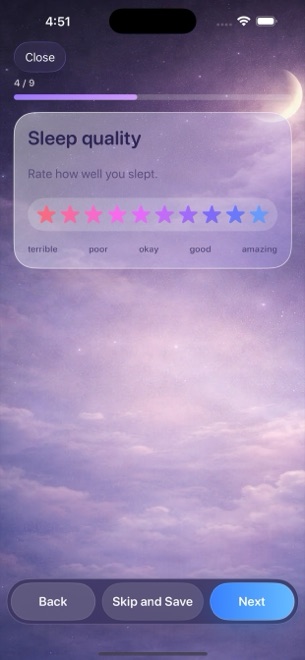
Dreams Calendar is deliberately manual and subjective. Each morning takes under sixty seconds in the Night Dream wizard: set your sleep window, rate sleep quality (1–10 stars) and morning energy (1–10 segments, each with a plain one-line reading), estimate sleep latency and awakenings, count nightmares, write your dream and tap emotion chips.
| Measurement | Dreams Calendar (v1.1) | AutoSleep / Pillow |
|---|---|---|
| Hardware required in bed | None — iPhone stays on nightstand; no watch on wrist | Apple Watch worn overnight (or bedside iPhone mic/motion in Pillow) |
| Heart rate, HRV & estimated REM stages | Not measured (no sensor or HealthKit access) | Core automated HealthKit sleep-stage & heart-rate charts |
| Dream diary & nightmare count | Full dream text + dedicated nightmare counter + 30 emotions | Minimal text notes; sensors cannot see dream content |
| Perceived sleep latency & morning energy | 1–10 morning energy + latency minutes rated by you | Algorithmic sleep efficiency & readiness rings |
| Daytime thoughts & evening reflections | Day Dreams + 5-question Day Reflections on same calendar | Overnight sleep focus only |
2. Zero HealthKit permissions and local SwiftData isolation
Biometric sleep trackers require read/write access to sensitive Apple Health records (and microphone permission if recording sleep audio in Pillow). Dreams Calendar never asks for Health, microphone, motion or calendar permissions.
Every entry lives strictly inside Dreams Calendar’s own SwiftData database on your iPhone or iPad with no account and zero app network calls — keeping subjective reflections isolated, though without iCloud sync or CSV export in v1.1.
| Privacy or scope detail | Dreams Calendar (v1.1) | AutoSleep / Pillow |
|---|---|---|
| Apple Health (HealthKit) access | Never requested | Required for watch sensor & stage analysis |
| Microphone / audio sleep recording | Never requested | Used in Pillow for snore/sleep-talk clips |
| Where data is stored | Local SwiftData on device only | HealthKit + local/iCloud sync |
| Export options | None in v1.1 | CSV / report exports available |
| Medical disclaimer | Personal reflection journal only — not medical advice | Consumer wellness estimates — not clinical polysomnography |
3. Cost comparison and using manual + watch logs together
AutoSleep is a paid upfront App Store download, and Pillow locks full history, audio recordings and sleep trends behind a recurring Pillow Premium subscription. Dreams Calendar is 100% free with zero subscriptions and unlocks all 10 Swift Charts immediately.
Even if you already wear an Apple Watch with AutoSleep, pairing it with Dreams Calendar answers the "why" behind rough nights by putting evening reflections, nightmares and dream emotions on one visual timeline.
| Scenario | Dreams Calendar | AutoSleep / Pillow |
|---|---|---|
| Price | $0 (free; occasional AdMob interstitials outside wizard) | Paid upfront (AutoSleep) or yearly subscription (Pillow) |
| Dislike wearing a watch to bed / charging overnight | Ideal 60-second manual sleep & dream log | Requires overnight wearable or plugged-in bedside mic |
| Want heart-rate & SpO2 graphs | Not a biometric tracker | Built specifically for Apple Watch sensors |
| Want dream recall + sleep-vs-emotion scatter chart | Purpose-built 10 Swift Charts free | Does not model dreams or daytime emotions |
Do I need an Apple Watch to track sleep in Dreams Calendar?
No. You enter your approximate sleep window and rate sleep quality, latency, awakenings and morning energy yourself in under a minute.
Does Dreams Calendar sync with Apple Health?
No. Dreams Calendar never asks for HealthKit permission and keeps all entries inside its own local database.
Why log manual sleep quality if I already have Apple Health sleep stages?
Wrist sensors often misjudge quiet wakefulness and cannot detect nightmares, dream emotions or daytime stress; your own 1–10 morning energy rating reflects how restored you actually feel.
Is Dreams Calendar a medical tool for sleep apnea or insomnia?
No. It is a personal journal and calendar only; consult a physician for medical sleep concerns.