Dreams Calendar vs Finch Self-Care: calm distraction-free calendar & charts vs gamified virtual pet streaks
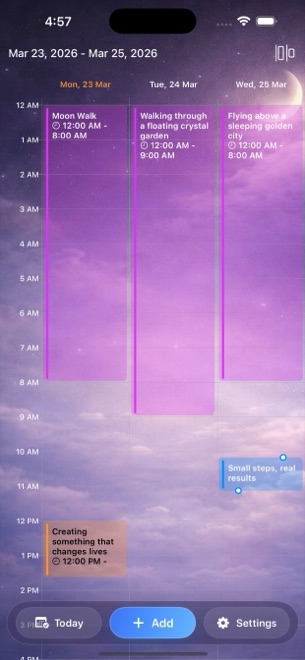
Finch turns daily habits, mood check-ins and reflections into energy points that send a cute virtual bird on adventures and unlock outfits. Dreams Calendar is built for people who want the exact opposite bedside atmosphere on iPhone and iPad: a quiet, adult calendar with zero gamification, one optional reminder, three focused entry wizards and 10 factual Swift Charts for free.
1. Calm bedside clarity vs virtual pet quests and animations
Finch motivates habit-building through rainbow stones, seasonal events, pet furniture shops, friend treehouses and soundscapes. While delightful during the afternoon, opening a brightly animated game loop at 6:45 AM floods sleepy working memory and wipes out delicate dream fragments before you type a word.
Dreams Calendar opens directly to a calm calendar or entry wizard. Night Dreams record your sleep window, seven sleep ratings, dream prose and 30 emotion chips; Day Dreams record daytime thoughts; and Day Reflections ask five grounded evening questions — with zero quests, coins or streak guilt.
| Dimension | Dreams Calendar (v1.1) | Finch Self-Care Pet |
|---|---|---|
| Core interface metaphor | Clean 6-view personal calendar & 10 Swift Charts | Virtual pet care, adventures, shop & daily quests |
| Overnight dream & nightmare logging | Dedicated Night Dream wizard + nightmare & awakening counters | General freeform reflection box only |
| Sleep window & latency tracking | Real-hour sleep blocks, 1–10 quality, 1–10 energy & latency minutes | No structured sleep-hour timeline |
| Notifications & reminders | At most 1 configurable daily reminder (off or custom time) | Pet adventure updates, goal nudges & friend vibes |
| Gamification / streaks | Zero streaks, points or virtual currency | Streaks, rainbow stones, outfits & seasonal passes |
2. Local SwiftData storage and honest boundaries
Dreams Calendar stores all entries locally inside SwiftData on your iPhone or iPad with no account, no friend codes and zero network requests from the app’s own code.
Finch also offers strong local-first storage (with optional manual backup files or cloud backup and friend-code sharing). Remember Dreams Calendar v1.1’s honest limits: there is no manual export file or cross-device sync yet, so standard iOS device backups protect your calendar when changing phones.
| Privacy or storage detail | Dreams Calendar (v1.1) | Finch |
|---|---|---|
| Account or friend codes | None — strictly solo app | Optional cloud backup & Tree Town friend codes |
| Permissions requested | Optional single daily notification only | Notifications & network for events/updates |
| Export / manual backup file | None in v1.1 (uses iOS device backup) | Manual backup export & cloud backup option |
| App lock | iOS 18 native Home Screen Require Face ID | In-app passcode option |
| Supported languages | 7 languages (EN, BG, DE, ES, FR, IT, RU) | Primarily English |
3. Pricing: $0 complete calendar vs Finch Plus subscriptions
Finch has a generous free tier alongside a recurring Finch Plus subscription that unlocks extra reflection prompts, deeper insights, full soundscapes and seasonal cosmetics.
Dreams Calendar has zero in-app purchases and no Plus tier: every wizard, calendar view and chart is free for everyone, supported by occasional AdMob full-screen ads that never interrupt writing.
| Question | Dreams Calendar | Finch |
|---|---|---|
| Subscription price | $0 (no Plus tier, no IAPs) | Free tier + recurring Finch Plus subscription |
| Statistical charts | 10 interactive Swift Charts unlocked free | Mood/tag insights partially expanded in Finch Plus |
| Best for brushing teeth, water & chore checklists | Not a daily habit/chore checklist | Playful, encouraging habit companion |
| Best for serious dream recall & sleep-mood patterns | Focused bedside wizard & 6 calendar views | Too busy at waking time; lacks sleep metrics |
Does Dreams Calendar use streaks or penalize me if I skip a week?
Never. There are no streaks, badges or sad mascots — your calendar simply waits for your next entry.
Can I turn off all notifications in Dreams Calendar?
Yes. Even the single daily reminder can be switched off anytime in Settings.
Are any of the 30 emotion chips or 10 charts locked behind a paid upgrade?
No. Every chip, entry type, view and chart is free.
Will an ad interrupt me while I am logging a morning dream?
No. Occasional AdMob interstitials only appear after roughly ten view switches or two saved entries, never mid-wizard.