Dreams Calendar vs Day One on iPhone: zero-subscription local dream calendar vs cloud life diary
Day One is the benchmark multi-platform life archive when you want photo galleries, audio recordings, printed books, PDF/JSON exports and end-to-end encrypted cloud sync on a yearly Premium plan. Dreams Calendar is built for a narrower daily habit at $0: logging night dreams, daydreams and five-question evening reflections locally on iPhone or iPad with 10 automatic Swift Charts.
1. Multimedia life archiving vs dedicated sleep-and-dream structure
Day One excels at rich long-form entries enriched with automatic weather, GPS coordinates, multiple photos, handwritten sketches and audio recordings. If you want to track dreams inside Day One, however, you have to build text templates manually, and Day One cannot parse those paragraphs into sleep-latency or nightmare graphs.
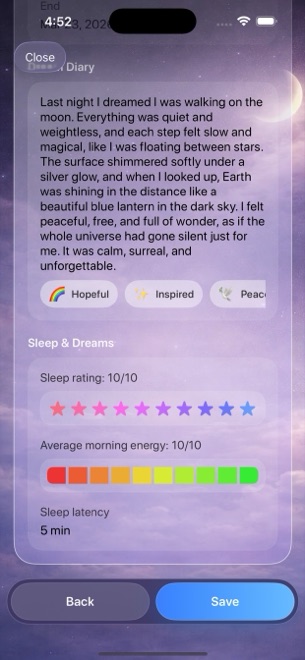
Dreams Calendar gives every sleep and reflection signal its own native control: real-hour sleep blocks on Day and Multi-day views, 1–10 sleep quality stars, 1–10 morning energy segments, latency minutes, awakenings, nightmares and 30 tappable emotion chips.
| Capability | Dreams Calendar (v1.1) | Day One |
|---|---|---|
| Core purpose | Night dreams, daydreams, sleep signals & evening reflections | General-purpose multimedia life diary & memory archive |
| Structured sleep & dream fields | 7 sleep metrics + 30 emotion chips built into wizard | Freeform text & custom prose templates only |
| Visual timeline layout | Sleep blocks drawn over real hours + Month, Year, Multi-day, List | Feed, calendar grid, map view & media gallery |
| Statistical charts | 10 interactive Swift Charts (sleep, emotions, nightmares, scatter) | Writing streaks, word counts & On This Day flashbacks |
| Photos, audio, weather & GPS stamps | None (requests zero camera, mic or location permissions) | Rich photos, video, audio transcription, weather & location |
| Platform availability | iPhone & iPad (iOS 18 / iPadOS 18+) | iPhone, iPad, Mac, Android & Web |
2. Local-only SwiftData vs cloud sync and archival exports
Day One is engineered for multi-decade portability: it syncs across devices using end-to-end encryption (with an account) and exports cleanly to PDF, JSON, plain text or physical printed books. If cross-device editing on Mac and downloadable archives are non-negotiable, Day One clearly wins.
Dreams Calendar makes the opposite trade-off for simplicity and local isolation: no account exists, the app’s code makes zero network calls, and data lives solely in SwiftData on one device. Version 1.1 includes neither cloud sync nor file export, so device-level iOS backups are your safety net.
| Data dimension | Dreams Calendar (v1.1) | Day One |
|---|---|---|
| Account requirement | No account or sign-in | Account used for sync & Premium features |
| Storage location | Local SwiftData on device only | Local cache + Day One cloud sync |
| Cross-device sync (iPhone ↔ iPad / Mac) | Not supported | Included in Day One Premium (free tier limits device count) |
| Export & book printing | No export in v1.1 | PDF, JSON, plain text export & paid hardcover book printing |
| Passcode / biometric lock | Via iOS 18 Home Screen Require Face ID | Built-in passcode & Face ID lock |
3. Multi-year subscription math vs free ad-supported access
Dream recall and sleep-pattern tracking take months or years to pay off. Paying an annual journaling subscription solely to jot down three morning sentences can feel steep when you never use cloud video hosting or map views.
Dreams Calendar unlocks every entry type, view and chart for $0 forever, funded by occasional AdMob full-screen ads after roughly ten view switches or two saved entries — never interrupting an active wizard.
| Question | Dreams Calendar | Day One |
|---|---|---|
| Full feature cost over 3 years | $0 (no subscriptions or IAPs) | Recurring annual Day One Premium subscription |
| Free tier limitations | None — all 3 entry kinds, 6 views & 10 charts included | Limits multi-device sync, media per entry & journal count |
| Ad experience | Occasional AdMob interstitial outside writing flow | Zero third-party ads |
| Choose this app when… | You want fast bedside dream/sleep/reflection charts for free | You want synced travel photos, audio logs & exported PDFs on Mac |
Can I import Day One entries into Dreams Calendar or export Dreams Calendar to PDF?
No. Dreams Calendar v1.1 has no import or export tool; entries are created, read, edited and deleted directly inside the app.
Does Dreams Calendar limit how many entries I can write for free?
No. Entries, emotion tags, calendar views and all 10 charts are completely unlimited with no paid tier.
Does Dreams Calendar stamp my location or weather automatically?
No. It never asks for location permission and makes zero network requests from its own code.
Can I use Dreams Calendar on my Mac?
Dreams Calendar v1.1 ships natively for iPhone (iOS 18+) and iPad (iPadOS 18+); Day One offers a dedicated Mac and web app.