How to Log Nightmares and Night Awakenings on iOS
One unsettling nightmare feels random, and three in a stressful week can make every bedtime feel tense. Logging nightmare counts alongside night awakenings, emotions, and brief evening reflections turns vague dread into concrete dates you can review calmly. Dreams Calendar tracks these signals privately on your device and charts them over time.
Separate nightmare frequency from vague impressions
Distressing dreams stand out vividly in memory, which often makes a rough fortnight feel like an unbroken streak of bad nights. Counting nightmares and night awakenings explicitly on a calendar preserves the quiet, uneventful nights in between too.
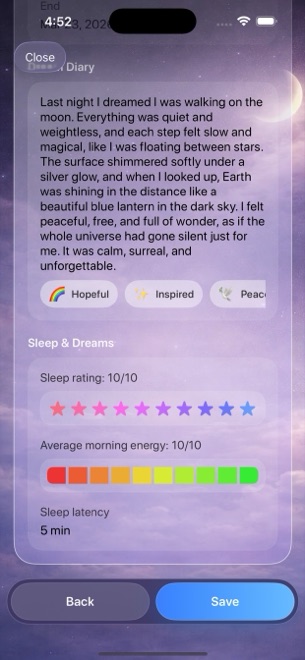
In Dreams Calendar, every Night Dream wizard includes dedicated counters for awakenings and nightmares alongside sleep duration and quality. Even if you prefer not to write down disturbing imagery in detail, recording the count and emotion tags keeps your timeline accurate.
- Dedicated nightmare count and awakening count on every Night Dream entry.
- Fifteen negative emotion chips — from anxious to worried — plus fifteen positive chips.
- Nightmares per Day chart and Awakenings over Time chart in Statistics.
Record enough context without reliving every detail
You never have to write a graphic replay if doing so makes your morning heavier. A two-line summary of the theme — such as being locked out, losing something important, or rushing against a deadline — captures the pattern without dwelling on the scare.
Tapping emotion chips underneath the diary records whether the dream felt panicked, frustrated, lonely, or merely strange, which later feeds into your emotion charts.
- Ground yourself first when waking from a bad dream before picking up your phone.
- Open a Night Dream entry, enter your sleep window, and increment the nightmare and awakening counts.
- Write a brief neutral label for the theme in the diary, or skip the text step if you only want the count.
- Tap the emotion chips that fit and rate how rested you feel upon waking.
Pair night entries with short evening reflections
Fragmented sleep and bad dreams frequently cluster around late work, conflict, skipped downtime, or irregular bedtimes. If you only log mornings, you miss what happened during the preceding sixteen hours.
Adding a two-minute Day Reflection before bed answers five grounded questions about how you spent the day, what was hard, and how you reacted. Viewing Multi-day timelines side by side shows amber daytime reflections right next to violet sleep blocks.
Know when personal tracking stops and professional care starts
Filtering the Nightmares per Day chart by month or year helps you verify whether a spike passed after a deadline or has persisted for weeks. Dragging across data points lets you inspect exact dates without flipping manually through dozens of pages.
Keep clear boundaries around what a journal can do: Dreams Calendar is a personal diary, not a therapeutic, psychiatric, or medical service. If nightmares or disrupted sleep cause ongoing distress or daytime impairment, share your observations with a qualified clinician.
Do I have to type out the nightmare text to track nightmare counts?
No. Every wizard step is optional, so you can log the nightmare count, awakenings, and emotion chips while leaving the diary text blank.
Can I see how often nightmares happened over the past three months?
Yes. Open Statistics from the view menu, check the Nightmares per Day chart, and filter by month, year, custom date range, or all time.
Is Dreams Calendar a treatment tool for nightmare disorders or insomnia?
No. It records what you log for personal awareness only and provides no diagnosis, coaching, or clinical treatment.