How to Track Sleep on iPhone Without a Wearable
You do not need a wrist sensor strapped on all night to find out which weeks leave you exhausted. A structured manual sleep log on your iPhone captures what wearables often guess poorly: how long you felt awake in bed, how rested you actually feel, and what happened in your dreams. Answering the same quick questions every morning builds a clear trend line within a month.
Why subjective sleep logs reveal real habits
Overnight wearables estimate sleep stages from movement and heart rate, which can make reading in bed look like light sleep or turn an algorithmic sleep score into morning anxiety. Sleep specialists still rely heavily on manual sleep diaries because perceived restfulness and time spent trying to fall asleep matter directly to how your day goes.
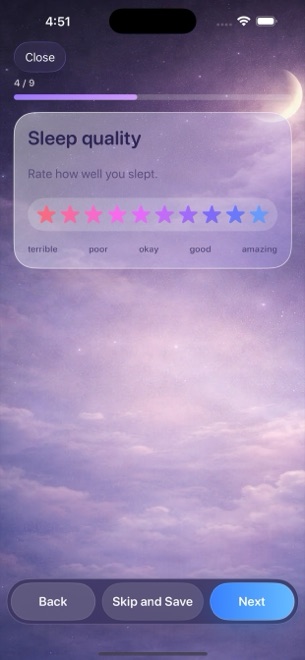
Dreams Calendar is deliberately manual rather than sensor-driven. You enter your sleep window and rate the night yourself in a short wizard, with no Apple Watch pairing and no HealthKit permissions required.
- Sleep window drawn across real hours on Day and Multi-day timelines.
- Ten-star sleep quality scale and ten-segment morning energy bar, each with one-line descriptions.
- Minutes to fall asleep, night awakenings count, and nightmare count in one pass.
Build a sixty-second morning rating habit
Manual logging fails when you try to reconstruct five nights from memory on Friday evening. By Wednesday, Monday night's two-hour struggle to fall asleep blurs into an average guess.
Answering the wizard once each morning keeps every number anchored to a fresh memory. Each value on the 1-to-10 quality and energy scales shows a plain one-line reading as you tap it, so a six on Tuesday means the same thing as a six three weeks later.
- Open Dreams Calendar in the morning and add a Night Dream entry.
- Set the approximate time you turned out the light and the time you woke up for good.
- Rate overall sleep quality from 1 to 10 stars and morning energy from 1 to 10 segments.
- Enter rough sleep latency in minutes plus how many times you woke up, then optionally add dream notes and emotions.
Avoid chasing perfection on approximate times
Clock-watching at two in the morning makes falling back asleep harder. Never check your phone during the night just to record an exact minute for your log.
A reasonable morning estimate — about twenty minutes to fall asleep, woke up twice — is plenty accurate to distinguish calm weeks from disrupted ones when plotted across thirty nights.
Spot bad weeks across five sleep charts
After two or three weeks of morning entries, open the Statistics view from the top-bar menu. Five dedicated Swift Charts track average sleep quality, sleep duration, sleep latency, awakenings, and morning energy over your chosen month, year, or custom date range.
Seeing duration stay steady while awakenings climb and morning energy drops tells a much clearer story than a single opaque sleep score. Remember that these charts simply summarize your personal journal entries and are not medical advice or a clinical sleep diagnosis.
Does Dreams Calendar connect to Apple Health or Apple Watch?
No. The app never asks for Health access or sensor data; you enter your sleep window and ratings manually each morning.
What if I only want to log sleep numbers and skip the dream diary?
Every step in the wizard can be skipped and saved, so you can log sleep hours, quality, latency, and energy even on mornings without remembered dreams.
Can manual sleep logs replace a doctor's sleep study?
No. Dreams Calendar is a personal reflection journal, not a medical device or diagnostic tool; consult a healthcare professional for persistent sleep concerns.