How to Track Nightmare Triggers and Sleep Latency on iPhone Without a Wearable
When you wake from a bad dream after taking an hour to fall asleep, a wrist wearable only tells you that your heart rate fluctuated—it has no idea what stressed you out at 4 PM or how many nightmares occurred. Pairing a three-minute evening Day Reflection with a morning Night Dream log on the same calendar lets you see how daytime friction and sleep latency interact.
Connect evening reflection answers to overnight sleep signals
In Dreams Calendar, daytime reflections and nighttime sleep logs share the same date grid and the exact same 30 positive and negative emotion chips. That makes it easy to check whether nights with long sleep latency or nightmares followed specific daytime stressors.
| Time of Entry | Wizard Type | Signals Logged | Chart to Inspect in Statistics |
|---|---|---|---|
| Before Bed (Evening) | Day Reflection | 5 structured questions (including "What was hard?") + 30 emotion chips | Most Common Negative & Positive Emotions |
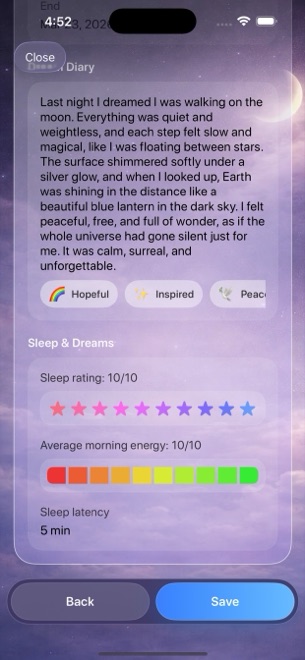
| Upon Waking (Morning) | Night Dream | Sleep latency (minutes), awakenings count, nightmare count, quality & energy | Sleep Latency, Awakenings & Nightmares per Day |
| Monthly Review | Multi-day & Statistics | Amber reflection blocks beside violet sleep blocks | Sleep Quality vs Emotion Balance scatter plot |
How to log nightmare triggers and latency in 4 calm steps
You never have to write out graphic nightmare scenes if you prefer not to—the nightmare counter and emotion chips work even when you leave the free-text diary blank.
- Before winding down for bed, tap Add > Day Reflection and answer the five short prompts—especially "What was hard?" and "How did you react?"—then tap any matching emotion chips.
- After waking the next morning, tap Add > Night Dream and enter your approximate sleep window.
- Estimate how many minutes it took to fall asleep (sleep latency) and increment the Awakening and Nightmare counters if any occurred.
- After two to four weeks, open Statistics and filter the Nightmares per Day and Sleep Latency charts by month to inspect which dates spiked.
Remember that personal tracking is not medical diagnosis
Seeing your own data on a calendar often shows reassuringly that bad nights cluster around specific deadlines rather than happening every night. However, Dreams Calendar is a personal self-reflection journal, not a medical device or clinical therapy tool. Always consult a qualified physician or sleep specialist for persistent insomnia or nightmare distress.
Can I log a nightmare count without writing down what happened in the dream?
Yes. Every step in the Night Dream wizard is optional, so you can record the nightmare count, awakenings, and emotion chips while skipping the text box.
Do I need Apple Watch or Apple Health enabled to track sleep latency?
No. Dreams Calendar never requests Apple Health permissions or wearable sensors; you enter a quick manual estimate each morning.
Can I tap a spike on the Nightmares per Day chart to see which date it was?
Yes. Drag your finger across any Swift Chart in Statistics to inspect individual dates and values, then open that day on the calendar.