How to Keep a Lucid Dream Signs and Reality-Check Log on iPhone Completely Offline
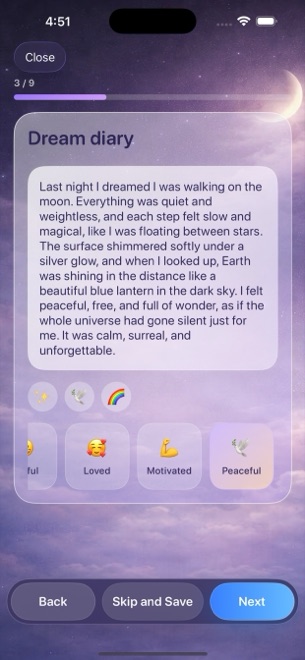
Learning to recognize when you are dreaming starts with two quiet habits: noticing your personal "dream signs" each morning and logging brief reality-check moments during the day. Instead of uploading private dream journals to a subscription cloud app, you can track both daytime cues and overnight recall locally on your iPhone or iPad with Dreams Calendar.
How to use Night Dream and Day Dream entries for dream-sign tracking
Dreams Calendar does not claim to induce lucid dreams automatically or beam audio into your bedroom. Instead, it gives you a structured, offline calendar where daytime visualization notes and morning dream logs live on the same hourly timeline.
| Practice Step | Dreams Calendar Entry Type | What to Record in the Wizard |
|---|---|---|
| Morning dream-sign capture | Night Dream | Recurring places, characters, or impossible physics + 30 emotion chips |
| Daytime reality check / intention | Day Dream | Timestamped note when an odd daytime moment reminded you to check reality |
| Wake-Back-to-Bed (WBTB) awareness | Night Dream (Awakenings counter) | Number of night awakenings alongside sleep duration and quality stars |
| Weekly dream-sign review | List & Multi-day views | Scan written notes sequentially to spot which settings repeat |
Build an offline dream-sign and reality-check routine in 4 steps
Consistency matters far more than writing thousand-word essays. Every step in the entry wizard is optional, so you can capture quick fragments in under sixty seconds.
- Set the single daily reminder in Dreams Calendar to match the exact minute you wake up so you capture dream fragments before standing up.
- Log a Night Dream entry each morning, placing recurring dream signs (such as "broken elevator," "childhood street," or "unreadable clock") on the first line of the diary.
- During the day, tap Add > Day Dream whenever you perform a reality check or notice a daytime scene that echoes a frequent dream theme.
- On Sunday evening, switch to List view to read the week's entries in order and check the Dream Logs per Week chart in Statistics.
Prioritize restful sleep over aggressive midnight alarms
Online lucid dreaming guides sometimes tell beginners to set multiple loud alarms in the middle of the night. Fragmenting your sleep intentionally often backfires, leaving you exhausted with poor recall. Keep an eye on your Morning Energy and Sleep Quality charts in Statistics—if your energy segments drop, prioritize uninterrupted rest.
Does Dreams Calendar send multiple reality-check alarms throughout the day?
No. By design, Dreams Calendar sends at most one configurable daily reminder so it never spams your lock screen.
Are my dream-sign notes uploaded to any server or AI model?
Never. All entries are stored strictly in a local SwiftData database on your iPhone or iPad with no account and no cloud sync.
Does the app interrupt morning dream writing with full-screen ads?
No. Occasional AdMob interstitials appear only after roughly ten view switches or a couple of saved entries—never while you are inside the entry wizard.