Logging Daydreams Alongside Night Dreams on iPhone
Daydreams, sudden creative flashes, and recurring afternoon worries often echo the exact themes that show up in your sleep hours later. Most dream apps ignore everything between sunrise and midnight, leaving daytime thoughts scattered across random scratchpads. Dreams Calendar gives daydreams their own lightweight entry type right on the same timeline as night dreams and reflections.
Know which of the three entry types fits the moment
Noticing your inner life across twenty-four hours works smoothly when every entry asks only the questions relevant to that time of day. Nobody wants to answer sleep-latency questions just to jot down a vivid afternoon thought on a train ride.
Tapping Add in the bottom toolbar lets you pick between three tailored entry wizards so daytime capture stays fast.
- Night dreams: sleep start and end window, dream diary, emotions, and seven sleep signals.
- Day dreams: free-text thought, visualization, or idea, timestamped with matching emotion chips.
- Day reflections: five structured evening questions plus emotion chips.
Capture wandering thoughts in thirty seconds
Mind-wandering during a walk, commute, or quiet break often surfaces unresolved questions or creative connections before you consciously sit down to brainstorm. Because daydreams fade almost as fast as REM dreams, capturing them immediately keeps them from disappearing into errands.
A Day Dream entry asks only for the time, your text note, and whichever of the thirty emotion chips fit the moment — whether hopeful, curious, nostalgic, or distracted.
- Tap Add from the toolbar whenever an image, visualization, or recurring thought catches your attention.
- Select Day Dream to skip all overnight sleep scales.
- Write the thought or scene plainly in a few lines while it is fresh.
- Tap the positive or negative emotion chips surrounding the thought and save.
Use six calendar views to read nights and days together
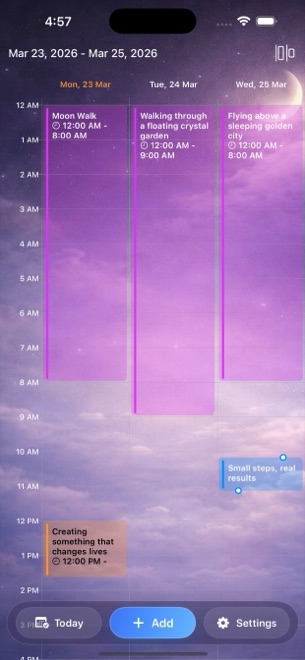
Once you log across both halves of the day, switching views from the top-bar menu changes the lens on your entries. Day and Multi-day timelines draw night dreams as long blocks spanning actual sleep hours, while daydreams and reflections sit at the exact hour you recorded them.
Month and Year views zoom out to show logging density across weeks and seasons, while List view lets you scan entry titles and notes sequentially without tapping day by day.
Notice daytime echoes without forcing interpretations
Sleep researchers frequently describe "day residue" — ordinary daytime preoccupations, conversations, or visual impressions reappearing remixed inside that night's dreams. Seeing a two o'clock daydream beside a three o'clock night dream often explains a puzzling symbol instantly.
Let those connections stay grounded and personal rather than treating every daydream like a puzzle to decode. Even when no obvious link appears, keeping creative ideas and emotional check-ins on a dedicated calendar makes any week easy to revisit on iPhone or iPad.
How is a Day Dream entry different from a Day Reflection?
A Day Dream captures a single timestamped thought, visualization, or idea with emotion chips, whereas a Day Reflection walks through five structured questions reviewing your whole day.
How many views does Dreams Calendar include for browsing entries?
Six views: Month, Day, Year, Multi-day timeline, List, and Statistics, all reachable from the menu in the top bar.
Does Dreams Calendar run natively on iPad as well as iPhone?
Yes, it runs on both iOS 18 and iPadOS 18, though entries remain local to whichever device you write them on.