Dreams Calendar vs Lucidity: iPhone & iPad calendar timelines vs Android-first lucid dream tools
Lucidity is widely referenced in lucid-dreaming forums for combining a dream notebook with WBTB/MILD induction guides, lucidity tags and reality-check notifications (primarily on Android). On iPhone and iPad, Dreams Calendar delivers a true visual calendar — drawing night dreams across real sleep hours alongside daydreams, evening reflections and 10 interactive Swift Charts for free.
1. Real-hour calendar views vs chronological lucid notebooks
Most dream apps named Lucidity organize entries as a scrolling list of dated cards tagged with lucidity, vividness or recurring characters. While handy for counting how many lucid dreams you had last month, a flat card list hides when you actually slept and what happened during the waking hours before bed.
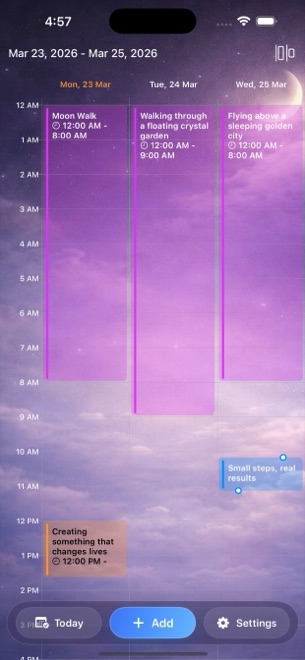
Dreams Calendar gives you six distinct ways to inspect your entries: Month, Day, Year, a Multi-day timeline where night dreams appear as violet blocks across their real sleep hours, a sequential List view and Statistics.
| Feature | Dreams Calendar (v1.1) | Lucidity Dream Journal |
|---|---|---|
| Platform focus | iPhone & iPad (iOS 18 / iPadOS 18+) | Android-first lucid dreaming journal (similar iOS namesakes vary) |
| Browsing views | 6 views: Month, Day, Year, Multi-day timeline, List, Statistics | Chronological entry feed, search & lucid stats |
| Sleep metrics per night | Sleep start/end, 1–10 quality, 1–10 energy, latency, awakenings, nightmares | Basic sleep/vividness tags; focused on lucid flags |
| Daytime & evening entries | Day Dreams (thoughts/visualizations) + 5-question Day Reflections | Overnight dream entries only |
| Lucid induction techniques (MILD/WILD) | Not included (observational journal) | Built-in technique guides & reality-check alerts |
| Emotion tagging | 30 tappable positive & negative chips across nights and days | Custom tags & basic dream feeling labels |
2. Ten Swift Charts and local SwiftData storage
In Dreams Calendar’s Statistics view, you can filter five sleep charts, two emotion frequency charts, weekly dream counts, daily nightmare counts and a sleep-quality-vs-emotion-balance scatter plot by month, year, custom range or all time — dragging your finger across points to read exact dates.
All calculations happen locally inside SwiftData on your device with no account sign-in and zero network calls from the app’s own code. Honest v1.1 limits apply: there is no cloud sync across devices, no file export button and no built-in PIN screen (use iOS 18’s native Require Face ID to lock the app icon).
| Dimension | Dreams Calendar (v1.1) | Lucidity |
|---|---|---|
| Charts included | 10 interactive Swift Charts with custom date filters | Dream count, lucid ratio & tag frequency charts |
| Data residency | 100% local SwiftData on device; no account | Local database with optional backup/export |
| Export to file | Not supported in v1.1 | Backup/export available in Android builds |
| Biometric / PIN lock | Via iOS 18 Home Screen Require Face ID | Built-in passcode / fingerprint option |
| Interface languages | 7 languages (EN, BG, DE, ES, FR, IT, RU) | Varies by build |
3. Free access without feature gating
Many lucid journals gate unlimited tags, dark themes, ad removal or multi-month charts behind one-time unlocks or subscriptions. Dreams Calendar ships with zero in-app purchases: every user gets all three entry types, all six views and all 10 charts immediately.
Occasional full-screen AdMob ads support the free app, appearing only after roughly ten view switches or two saved entries and never while you are writing inside the wizard.
| Criterion | Dreams Calendar | Lucidity |
|---|---|---|
| Price for all charts & views | $0 (no IAPs, no subscriptions) | Free base app with paid Premium unlock for extra stats/features |
| Ads during dream entry | Never shown inside the entry wizard | Ad-supported base tier unless upgraded |
| Best for iPad split/large-screen review | Native iPadOS 18 layout for timelines & charts | Primarily phone-oriented |
| Best for connecting daytime stress to night dreams | Amber Day Reflections sit beside violet Night Dreams | Tracks night dreams in isolation |
Does Dreams Calendar have a specific checkbox for lucid dreams?
There is no separate lucid induction toolkit; you can note lucidity in the dream diary text while tracking sleep quality, awakenings and 30 emotions.
Can I view my dreams across a whole week on real hour lines?
Yes. The Multi-day view draws Night Dreams across their actual sleep hours alongside timestamped Day Dreams and Day Reflections.
Does Dreams Calendar sync between my iPhone and iPad?
No. Version 1.1 stores data locally in SwiftData on each device without iCloud or server sync.
How do I filter charts in Dreams Calendar?
Open Statistics from the top-bar menu, pick Month, Year, Custom range or All time, and drag across any chart to inspect individual points.