Dreams Calendar vs Grid Diary on iOS: calendar-first night & day wizards vs multi-box prompt grids
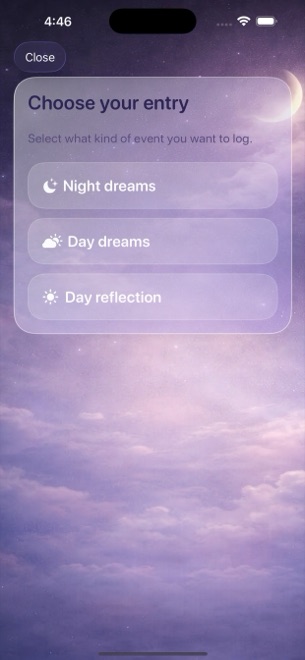
Grid Diary replaces blank pages with a multi-cell grid of customizable daily, weekly and monthly prompt boxes. Dreams Calendar also eliminates blank-page paralysis, but organizes prompts by what part of the 24-hour cycle you are actually living — separating Night Dreams, daytime Day Dreams and evening five-question Day Reflections across six calendar views and 10 free Swift Charts.
1. Sequential one-question wizard vs multi-box prompt grids
Grid Diary shows six or eight prompt tiles on one screen (for example: gratitude, career, family, health, dream, finances) and lets you tap whichever box you feel like filling in. That board works nicely for evening life reviews, yet it treats overnight sleep and dreams as just one tiny text square with no numeric scales.
Dreams Calendar presents one calm question at a time in three specialized wizards. Evening Day Reflections mirror Grid Diary’s strength with five focused prompts (how you spent the day, what was hard, how you reacted, what you enjoyed, how you feel now), while Night Dreams add real sleep windows, 1–10 quality and energy scales, latency, awakenings, nightmares and 30 emotion chips.
| Feature | Dreams Calendar (v1.1) | Grid Diary |
|---|---|---|
| Prompt layout | One question per screen in 3 time-of-day wizards | Customizable multi-box grid per day/week/month/year |
| Customizing prompt text | Fixed, well-tested questions (every step skippable) | Fully editable prompt questions & template library |
| Sleep & nightmare tracking | 7 sleep metrics + violet blocks over real sleep hours | Text answers only (no sleep-latency or nightmare charts) |
| Emotion vocabulary | 30 tappable positive & negative chips per entry | Stickers/mood icons or written answers |
| Statistical charts | 10 interactive Swift Charts connecting sleep & emotions | Habit check-ins, writing streaks & entry stats |
2. Local SwiftData simplicity vs cloud accounts and exports
Grid Diary supports cross-device cloud sync, photo attachments, Markdown/PDF export and passcode locks (with several sync, unlimited-template and attachment features tied to its paid membership).
Dreams Calendar keeps everything strictly inside local SwiftData on your iPhone or iPad with no account sign-in and zero network calls from app code. Keep v1.1’s honest boundaries in mind: no cloud sync, no photo attachments and no export button — just fast local browsing across Month, Day, Year, Multi-day, List and Statistics.
| Capability | Dreams Calendar (v1.1) | Grid Diary |
|---|---|---|
| Account & cloud sync | None — 100% local SwiftData on device | Grid Diary cloud / iCloud sync options |
| Photos & stickers | None (text, scales & emotion chips only) | Photo attachments & mood stickers |
| Export formats | None in v1.1 | PDF, Markdown, JSON/text export |
| Passcode / Face ID | Via iOS 18 Home Screen Require Face ID | Built-in passcode / Face ID lock (membership rules may apply) |
| Daily notifications | 1 configurable daily reminder (8:30 AM default) | Multiple custom prompt reminders |
3. Zero membership cost for multi-year reflection
When you want both structured evening prompts and real morning dream-and-sleep charts without another annual journaling membership, Dreams Calendar covers all three entry types and all 10 charts for $0.
Occasional full-screen AdMob ads appear only after roughly ten view switches or two saved entries, never interrupting an open reflection or dream wizard.
| Criterion | Dreams Calendar | Grid Diary |
|---|---|---|
| Price for full charts & unlimited entries | $0 (no subscriptions, no IAPs) | Freemium; paid membership unlocks full sync, templates & locks |
| Best for weekly/monthly/yearly custom grids | Daily night, daydream & evening wizards | Dedicated weekly, monthly & yearly review grids |
| Best for connecting evening reflections to sleep | Side-by-side timeline blocks + 10 Swift Charts | No quantitative sleep or emotion-balance charts |
Can I write my own custom questions in Dreams Calendar like Grid Diary?
No. Dreams Calendar uses fixed wizards for Night Dreams, Day Dreams and five-question Day Reflections so setup takes zero effort and charts stay consistent.
Can I leave half of the reflection questions blank on a quiet evening?
Yes. Every step in every wizard is skippable and saves cleanly with whatever you answered.
Does Dreams Calendar show day reflections and night dreams together?
Yes. Day and Multi-day timelines plot night dreams across your sleep hours right alongside timestamped day reflections and daydreams.
Is there any limit on historical entries in the free app?
None. Entries and all-time chart filtering are unlimited.