Dreams Calendar vs Bear & Craft Notes: structured sleep & dream signals vs long-form Apple writing apps
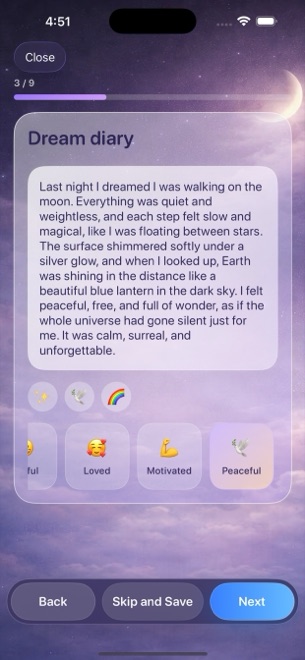
Bear and Craft are two of the finest native writing apps on Apple platforms for essays, nested hashtags, project docs and polished PDFs. When used as a morning dream journal, however, both remain document editors — whereas Dreams Calendar gives iPhone and iPad users a true sleep-hour calendar, 30 tappable emotion chips, five-question evening reflections and 10 free Swift Charts.
1. Structured personal signals vs prose document editors
Bear organizes Markdown notes with nested `#dream/vivid` tags, while Craft offers Daily Notes tied to calendar dates with rich blocks and styling. Both feel wonderful when writing 500-word essays at a desk, yet neither understands what a sleep window, sleep latency minute, night awakening count or morning energy rating is.
Dreams Calendar separates numerical signals from free text inside a fast step-by-step wizard: Night Dreams capture sleep mechanics plus dream prose and emotions, Day Dreams log daytime flashes, and Day Reflections ask five calm evening questions.
| Feature | Dreams Calendar (v1.1) | Bear / Craft |
|---|---|---|
| Primary data unit | Timed calendar entries (Night Dream, Day Dream, Day Reflection) | Markdown notes (Bear) or block documents & Daily Notes (Craft) |
| Sleep & dream signals | Sleep window, 1–10 quality, 1–10 energy, latency, awakenings, nightmares | None (prose or manual checklists only) |
| Emotion tracking | 30 tappable positive & negative chips counted in charts | Manual tags in Bear; manual text in Craft |
| Calendar & timeline views | Month, Day, Year, Multi-day sleep-hour blocks, List, Statistics | Tag sidebar (Bear) or Daily Notes calendar picker (Craft) |
| Built-in statistical charts | 10 interactive Swift Charts | None (word/character statistics only) |
2. Storage, sync, export and native Apple craft
Bear and Craft shine when you need cross-device iCloud/cloud sync across Mac, iPad and iPhone, plus rich Markdown, PDF, DOCX or ePub export and per-note encryption (Bear Pro).
Dreams Calendar is equally native to iOS 18 and iPadOS 18 (built with SwiftData and Swift Charts), but chooses strict single-device simplicity: zero accounts, zero cloud sync and no file export in v1.1, with optional app locking handled via iOS 18’s Home Screen Require Face ID.
| Criterion | Dreams Calendar (v1.1) | Bear / Craft |
|---|---|---|
| Platform support | iPhone & iPad (iOS 18 / iPadOS 18+) | iPhone, iPad, Mac (plus Web/Windows in Craft) |
| Where data lives | On-device SwiftData only; 0 app network requests | Local Bear + iCloud (Pro) / Craft cloud workspaces |
| Export formats | None in v1.1 | Markdown, PDF, HTML, DOCX & more |
| Note / app lock | iOS 18 native Require Face ID | Encrypted locked notes (Bear Pro) / OS lock |
| UI languages | 7 languages (EN, BG, DE, ES, FR, IT, RU) | Multiple languages |
3. Free forever vs annual Pro writing subscriptions
Bear Pro and Craft Plus require recurring subscriptions for multi-device sync or unlimited document/block allowances. Paying for a document suite makes sense when you write articles or work docs all day, not just to jot down three sleep numbers at dawn.
Dreams Calendar costs $0 with zero subscriptions and zero feature gates, supported by occasional AdMob full-screen ads outside the writing screens.
| Use case | Dreams Calendar | Bear / Craft |
|---|---|---|
| Cost for full functionality | $0 (100% free; occasional AdMob interstitials) | Free single-device/capped tiers; paid Pro/Plus subscriptions |
| Morning dream & sleep habit | Purpose-built 60-second wizard + 10 charts | Blank page without sleep metrics or charts |
| Long-form essays, work docs & PDF publishing | Not a document processor | Best-in-class Apple writing & export tools |
Does Dreams Calendar support Markdown formatting inside the dream diary?
Dreams Calendar uses clean plain-text fields paired with structured emotion chips and sleep scales rather than Markdown styling.
Can I browse my entries chronologically like Bear’s note list?
Yes — switch to List view from the top-bar menu to scan every entry in order, or switch to Month, Day, Year or Multi-day views.
Does Dreams Calendar run natively on iPadOS 18?
Yes, with dedicated iPad layouts for calendar timelines and Statistics, keeping entries local to that iPad.
Are any views or emotion chips behind a Pro upgrade?
No. Dreams Calendar has no paid tier or in-app purchases.