Dreams Calendar vs Reflectly: offline SwiftData dream & reflection calendar vs AI prompt paywalls
Reflectly wraps daily mood check-ins inside an upbeat AI conversational interface with motivational quotes and a prominent subscription paywall. Dreams Calendar strips away chatbots, accounts and recurring fees, offering a calm offline iPhone and iPad calendar for night dreams, daydreams and five-question evening reflections.
1. Predictable one-question wizard vs conversational AI prompts
Reflectly greets you like a chatty companion: you slide a mood bar, pick what influenced your mood and answer AI-generated follow-up prompts sprinkled with positivity quotes. While friendly for daytime venting, chat-bubble animations slow you down at 6:45 AM when a dream scene is evaporating from short-term memory.
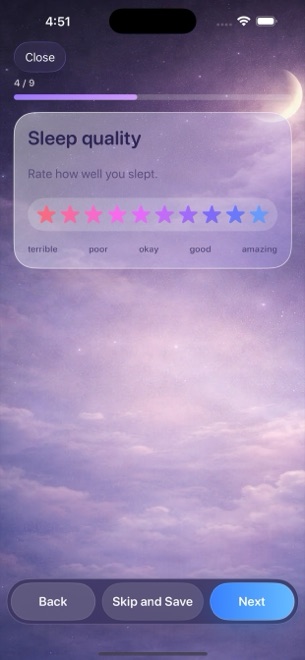
Dreams Calendar asks the same honest, predictable questions every time so muscle memory takes over. In under sixty seconds you can record your sleep hours, 1–10 quality stars, 1–10 morning energy, latency, awakenings, nightmares, dream text and 30 emotion chips.
| Feature | Dreams Calendar (v1.1) | Reflectly |
|---|---|---|
| Interaction model | Fast, predictable step-by-step wizard (all steps optional) | Conversational chatbot-style sliders & dynamic AI prompts |
| Dream & sleep logging | Dedicated Night Dream entry with 7 sleep signals + diary | General text notes only; no sleep-hour blocks or nightmare counts |
| Daytime & evening logging | Day Dream thoughts + 5-question Day Reflection | Mood check-ins, gratitude prompts & daily challenges |
| Emotion granularity | 30 tappable positive & negative chips per entry | Mood slider + broad factor categories |
| Tone | Quiet, neutral calendar without quotes or pep talks | Upbeat coaching, quotes & daily streak encouragement |
2. On-device SwiftData privacy vs cloud-backed AI accounts
Apps built around cloud accounts and AI-tailored prompts require network authentication and remote data handling. Dreams Calendar requires zero registration: install it from the App Store, open the calendar and write immediately.
Every entry stays inside the app’s local SwiftData store on your iPhone or iPad, and the app’s own code makes zero network requests. Be aware of the local-only trade-offs in v1.1: there is no cross-device cloud sync and no export button, so backing up your iPhone preserves your history.
| Privacy factor | Dreams Calendar (v1.1) | Reflectly |
|---|---|---|
| Account creation | None | Account used for cloud storage & subscription restore |
| Where entries live | On-device SwiftData only | Cloud-synced account storage |
| Network activity | Only Google AdMob SDK for occasional ads; 0 entry uploads | Cloud sync, AI prompt delivery & subscription checks |
| Biometric protection | iOS 18 native Home Screen Require Face ID | In-app biometric / passcode lock |
| Multi-device sync & export | None in v1.1 | Account sync across mobile devices |
3. Zero paywall walls vs trial-and-subscription prompts
A frequent frustration with AI diary apps is hitting hard paywalls when trying to view deeper statistics, unlock unlimited guided prompts or browse historical mood breakdowns. Dreams Calendar never asks for a credit card or free-trial signup.
Every view (Month, Day, Year, Multi-day, List, Statistics) and all 10 interactive Swift Charts are permanently free, supported only by occasional AdMob interstitials that never interrupt active writing.
| Comparison point | Dreams Calendar | Reflectly |
|---|---|---|
| Cost | $0 — no subscriptions, no trials, no IAPs | Recurring subscription required for full AI prompts & stats |
| Included charts | 10 local Swift Charts (5 sleep, 2 emotion, 2 count, 1 scatter) | Full mood correlations & insights gated by subscription |
| Ad policy | Occasional AdMob interstitial after ~10 view switches or ~2 saves | Subscription paywalls instead of ad-supported full access |
| Best suited for | Self-directed dream, sleep & reflection tracking on iOS 18+ | Users who want upbeat AI journaling prompts & quotes |
Does Dreams Calendar require starting a free trial to see my charts?
No. There are no trials, subscriptions or in-app purchases in Dreams Calendar; all 10 charts open for free.
Does an AI read my reflections in Dreams Calendar?
Never. Dreams Calendar contains no AI chatbot or cloud text analysis; everything stays locally in SwiftData.
How many notifications will Dreams Calendar send me?
Only one daily reminder at the time you set (8:30 AM by default), or zero if you toggle it off in Settings.
Does AdMob track me across other apps in Dreams Calendar?
Dreams Calendar does not ask for App Tracking Transparency permission, so ads are not personalized across other apps, and your journal entries are never shared.